How to Optimize the WooCommerce Database for Speed
7 min read
CloudStick Team
Backend Developer
Share this article
DB Tuning
Why WooCommerce Databases Bloat
A WooCommerce store writes far more rows per hour than a typical WordPress blog, and most of that writing never gets cleaned up. Every product edit adds a row to `wp_posts` as a revision. Every cart action, price calculation, and shipping lookup writes a short-lived row into `wp_options` as a transient. Every visitor who adds something to a cart, whether they check out or not, gets a row in `wp_woocommerce_sessions`.
None of this is a bug — it is how WooCommerce is designed to work. The problem is that WordPress core has no built-in aggressive cleanup for any of it, so `wp_postmeta` and `wp_options` grow indefinitely on active stores. A table with millions of unindexed or duplicate rows turns every product page, cart fragment refresh, and checkout query into a slow table scan instead of a fast indexed lookup.
The symptoms usually show up before anyone thinks to check the database: product pages that took 200ms now take a full second, the admin product list becomes sluggish to paginate, and slow query logs fill up with `SELECT` statements against `wp_postmeta` or `wp_woocommerce_sessions` that scan far more rows than they return. On a 500-product store with a handful of plugins, it is common to find `wp_postmeta` holding several million rows within a year — most of them revision meta, expired transients, or session leftovers that nobody is reading anymore.
Cleaning Revisions, Transients, and Orphaned Meta
Post revisions and expired transients are the two easiest wins, and WP-CLI clears both safely in seconds. Revisions pile up in `wp_posts` every time a product description or page is saved, and expired transients sit in `wp_options` long after their timeout because WordPress only deletes them lazily, on the next matching read.
wp post delete $(wp post list --post_type='revision' --format=ids) --force
# Remove orphaned postmeta rows left behind by deleted products/orders
wp db query "DELETE pm FROM wp_postmeta pm LEFT JOIN wp_posts p ON p.ID = pm.post_id WHERE p.ID IS NULL;"
Run these on a schedule rather than manually. A weekly cron entry calling `wp transient delete --expired` and a revision cleanup keeps `wp_options` and `wp_postmeta` from creeping back up between maintenance windows.
Taming wp_woocommerce_sessions
`wp_woocommerce_sessions` grows unbounded because every anonymous visitor who touches the cart — including bots and abandoned sessions — gets a row, and WooCommerce's own cleanup only fires through WP-Cron. On stores where WP-Cron never runs (traffic drops, a caching plugin skips `wp-cron.php`, or the site relies on a real system cron that was never configured), expired sessions are never purged and the table can reach hundreds of thousands of rows.
Check the row count first, then confirm WooCommerce's scheduled cleanup event is actually registered:
wp db query "SELECT COUNT(*) FROM wp_woocommerce_sessions;"
wp cron event list | grep woocommerce
# If wc_cleanup_sessions is missing or overdue, trigger it manually once
wp cron event run wc_cleanup_sessions
For high-traffic stores, disable the default pseudo-cron in `wp-config.php` with `define('DISABLE_WP_CRON', true);` and hit `wp-cron.php` from a real system cron every few minutes instead — WP-Cron only fires on page load, so a quiet store or one behind full-page caching can go hours without triggering it.
Indexing SKU and Price Lookups
Catalog and shortcode queries that filter by `_sku` or `_price` are slow on the legacy `wp_postmeta` table because `meta_value` is a `LONGTEXT` column with no useful index — MySQL can only do a full scan or a partial-prefix index on it. This is exactly why WooCommerce introduced `wp_wc_product_meta_lookup`, a dedicated table with proper columns and indexes for `sku`, `min_price`, `max_price`, `stock_quantity`, and more.
Make sure that table is actually populated and current — plugins that write product meta directly, or a botched import, can leave it stale:
# Regenerate the product lookup table (safe to run anytime)
wp wc tool run regenerate_product_lookup_tables
# Confirm an index exists before assuming a slow query needs a custom one
wp db query "SHOW INDEX FROM wp_wc_product_meta_lookup;"
If a custom plugin still queries `wp_postmeta` directly for `_sku` or `_price`, adding a composite index on `(meta_key, meta_value(20))` can help, but test it on a staging copy first — every extra index adds write overhead to a table that already receives heavy traffic during checkout. In most cases the better fix is simply pointing the query at `wp_wc_product_meta_lookup` instead of reinventing an index that WooCommerce already maintains for you.
Running mysqlcheck and OPTIMIZE TABLE
Deleting rows does not shrink a table on disk — InnoDB marks the space as reusable but keeps the file size the same until you defragment it. After a big cleanup pass (revisions, transients, stale sessions), run `mysqlcheck` to verify table health and `OPTIMIZE TABLE` to reclaim the freed space and rebuild indexes.
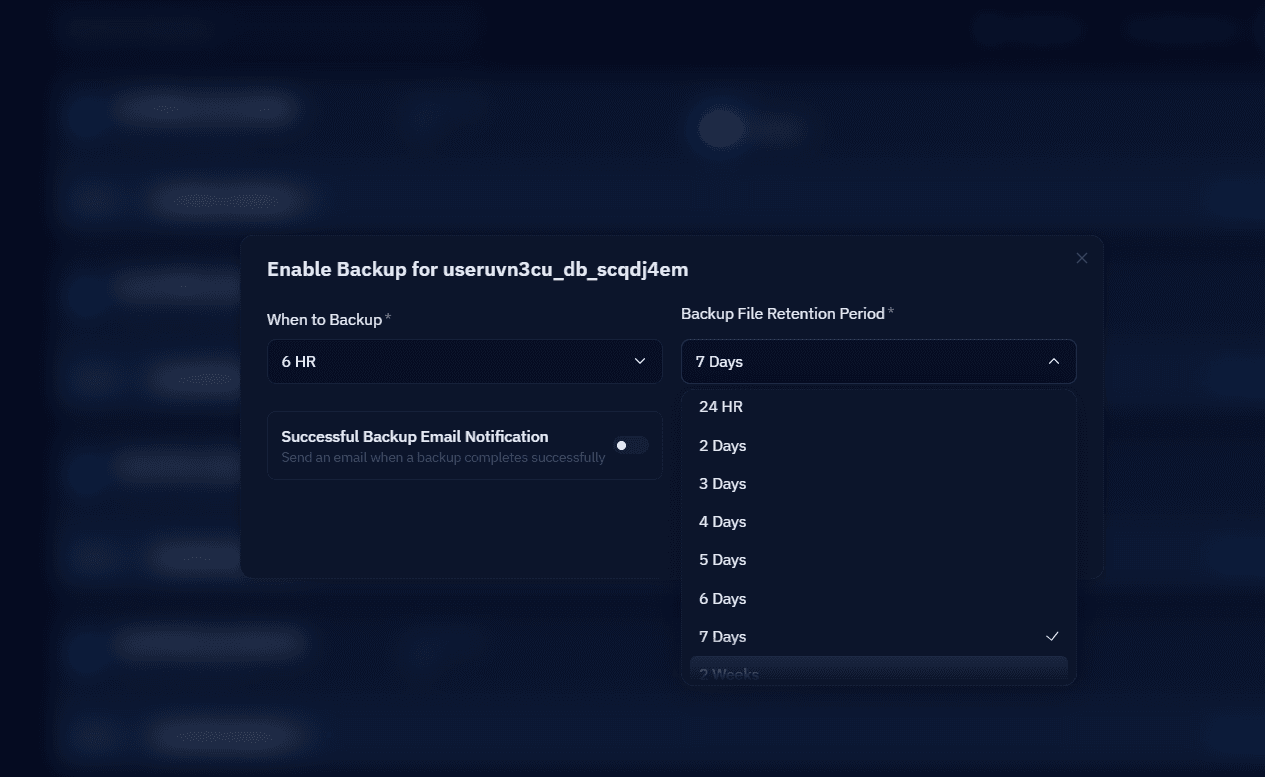
`OPTIMIZE TABLE` on InnoDB rebuilds the entire table and takes a brief write lock while it does. Run it during low-traffic hours, and always take a fresh backup first — CloudStick's Visual Database Manager lets you trigger an on-demand backup of your WooCommerce database in a couple of clicks before running anything destructive, so you don't have to script `mysqldump` by hand.
A Practical Weekly Maintenance Routine
Database bloat is a maintenance problem, not a one-time fix, so the routine matters more than any single cleanup. A sane weekly job: delete expired transients, purge revisions older than 30 days, confirm the WooCommerce session cleanup cron actually ran, and check table sizes with `wp db size --tables`. Once a month, run `mysqlcheck --optimize` on the tables that changed the most.
Pair this with Redis object caching so repeated `_sku` and `_price` lookups within a request don't hit MySQL at all, and with per-database backup scheduling before any optimize run. A store that stays on top of these five checks rarely needs an emergency database rescue — the slow checkout page usually turns out to be a `wp_options` table nobody had cleaned in a year.
None of these steps require downtime or a plugin that promises to "supercharge" your database. They are the same maintenance tasks a competent database administrator would run against any high-write MySQL application — WooCommerce just happens to generate that write volume through carts, sessions, and product meta instead of application logs. Schedule the cleanup, verify it actually ran, and check table sizes on a recurring basis, and the database stops being the bottleneck between a visitor and a completed order.
Before OPTIMIZE TABLE runs anywhere near production — a scheduled database backup with retention, straight from CloudStick.

%203.png&w=256&q=75)