How to Configure SPF, DKIM, and DMARC Records

%203.png&w=256&q=75)
What each protocol actually proves
The three protocols answer three different questions, and receivers check all of them on every message. SPF asks: is the connecting server allowed to send mail for this domain? DKIM asks: was this message cryptographically signed by the domain, and has it arrived unaltered? DMARC ties both to the From address the human actually sees, and tells the receiver what to do when neither check holds up.
The subtlety most guides skip: SPF is verified against the envelope-from — the Return-Path address used in the SMTP MAIL FROM command — not the From header displayed in the inbox. A spammer can pass SPF perfectly using their own domain in the envelope while spoofing yours in the visible From header. That gap is precisely why DMARC exists: it requires the domain that passed SPF or DKIM to align with the header From domain. Without DMARC, SPF and DKIM authenticate the plumbing but not the name on the envelope.
SPF: syntax, qualifiers, and the 10-lookup limit
SPF is a single TXT record on the domain root listing every source allowed to send as you. Each mechanism widens the set: ip4 and ip6 authorize literal addresses or CIDR ranges, a authorizes whatever the domain's A record points to, mx authorizes the hosts in your MX records, and include pulls in another domain's entire SPF policy — which is how you authorize Google Workspace or a transactional provider. The qualifier on the final all decides what happens to everything else: ~all asks receivers to softfail unknown senders (accept but treat as suspicious), while -all tells them to fail outright. Start with ~all while validating; move to -all once DMARC reports confirm nothing legitimate is failing.
SPF evaluation is capped at 10 DNS lookups. Every include, a, mx, ptr, and exists mechanism costs one — and nested includes count too (include:_spf.google.com alone spends three). Cross the limit and receivers return permerror, which DMARC treats as a failure. If your record accumulates SaaS includes until it bursts, the fix is flattening: replacing includes with the ip4 ranges they resolve to. But those ranges change without notice, so only flatten with a tool or service that re-resolves and republishes automatically — a hand-flattened record rots silently.
A domain must have exactly one TXT record starting with v=spf1. Publishing a second one — the classic mistake when adding a new email provider — makes every SPF check return permerror, a permanent fail, even if each record is individually valid. Never add a second record; merge the new mechanism into the existing one.
DKIM: selectors, 2048-bit keys, and rotation
DKIM is a key pair. The private key lives on your mail server and signs a hash of selected headers plus the message body into a DKIM-Signature header on every outgoing message. The public key is published as a TXT record at selector._domainkey.yourdomain — the receiver reads the s= (selector) and d= (domain) tags from the signature, fetches that record, and verifies the hash. Selectors are the rotation mechanism: because each key lives under its own name (mail1, mail2), you can publish a new key at a new selector, switch the server to sign with it, and delete the old record a week later once queued mail has drained — zero downtime. Use 2048-bit RSA; 1024-bit keys are deprecated and within reach of brute-forcing. Since a 2048-bit public key exceeds the 255-character limit of a single TXT string, it is published as two quoted strings that receivers concatenate — most DNS providers handle the split for you.
Know what breaks signatures, because it is never the cryptography: any modification of signed content after signing. Mailing lists that append an unsubscribe footer change the body hash. List software that prefixes the subject with a tag rewrites a signed header. Security gateways that rewrite links to scanning URLs alter the body. In every case the message is legitimate, the signature verifies as failed, and only DMARC's two-path design — SPF or DKIM — keeps the mail alive.
DMARC: alignment and the staged rollout
DMARC passes when at least one of two paths holds: SPF passes and the envelope-from domain aligns with the header From domain, or DKIM passes and its d= domain aligns with the header From domain. Alignment comes in two modes. Relaxed (adkim=r, aspf=r — the default) accepts an organizational-domain match, so mail.example.com aligns with example.com. Strict (adkim=s, aspf=s) demands an exact match. Start relaxed; strict mode mainly matters when you cannot trust every subdomain of your own zone.
Roll the policy out in stages. Publish p=none first and simply collect reports for two to four weeks — nothing is blocked, but every receiver tells you what would have been. Then move to p=quarantine with pct=25, sending a quarter of failing mail to spam, and ratchet pct upward as the reports stay clean. Only then publish p=reject, which instructs receivers to refuse failing mail during the SMTP conversation itself.
Do not jump straight to p=reject. Forwarding breaks SPF (the forwarder's IP is not in your record) and mailing lists routinely break DKIM — so legitimate mail that has always arrived starts being silently refused, with no bounce reaching you and no error in your logs. The p=none monitoring phase exists to surface exactly these flows before they become invisible losses.
Reading DMARC aggregate reports
The rua tag is where the rollout intelligence comes from: each participating receiver (Google, Microsoft, Yahoo) emails a zipped XML report to that address roughly daily. Every record row contains a source IP, a message count, and the SPF and DKIM results with their alignment verdicts. Read them with one question in mind: which rows fail both checks but come from senders that are actually mine? A row showing 400 messages from your CRM's IP failing alignment means a legitimate service you forgot to authorize — add it to SPF or give it a DKIM key before tightening the policy. Rows from random consumer ISPs failing everything are the spoofers your policy will soon be rejecting; that is the system working. Raw XML gets tedious across dozens of receivers, so most teams point rua at a parsing service that graphs sources over time. The ruf forensic-report tag also exists, but most large receivers no longer send per-message forensic copies for privacy reasons — do not depend on it.
Verifying all three with dig, and your next step
Three dig queries confirm everything you published is actually visible to the world — run them from your server or laptop rather than your DNS provider's dashboard, so you see what receivers see:
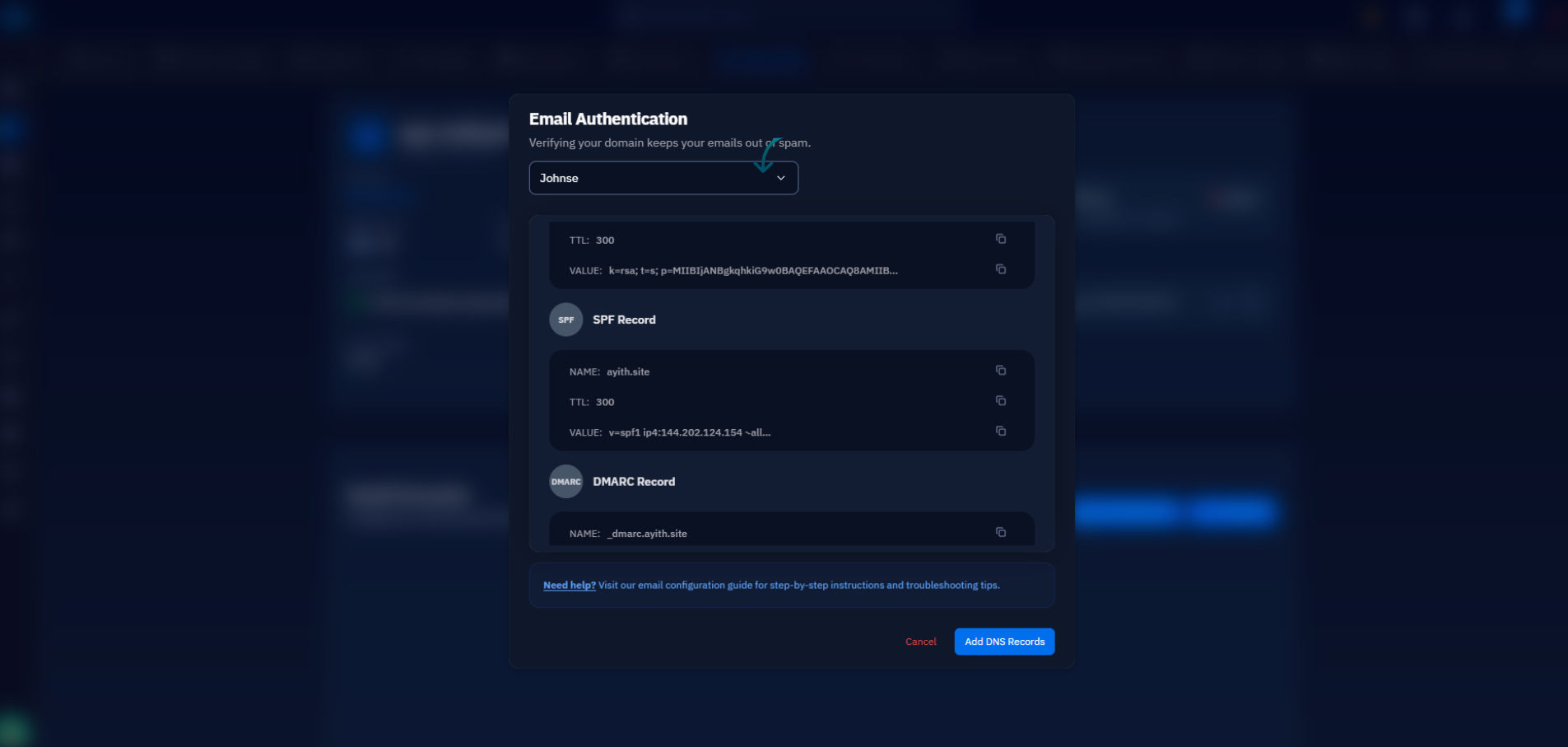
Then run an end-to-end check: send a message to a Gmail address, open it, and choose Show original — Gmail prints a one-line PASS or FAIL verdict for SPF, DKIM, and DMARC along with the domains it evaluated. If you host email on a CloudStick-managed server, the records themselves are not a manual chore: during mail setup CloudStick publishes the SPF, DKIM, and DMARC records for you through its Cloudflare integration, or displays the exact host and value pairs to paste into any other DNS provider. Your practical next step is the monitoring phase: publish p=none with a rua address today, let two weeks of reports accumulate, and you will know precisely which senders to fix before a single legitimate message is put at risk.

