How to Secure Customer Data on a WooCommerce Server

%203.png&w=256&q=75)
Force SSL Across The Whole Store
Every request to a WooCommerce store must be forced onto HTTPS at the web server, not left to a WordPress plugin, because checkout, login, and my-account pages carry session cookies and personal data that are exposed the moment a browser is allowed to load the page over plain HTTP first.
A plugin-based redirect (like the one bundled in some SSL plugins) only fires after WordPress has already bootstrapped, so an attacker running a downgrade or sniffing an open Wi-Fi network can still catch the first plaintext request. The fix belongs in the web server config: add an unconditional 301 redirect from port 80 to port 443, force `WP_SITEURL` and `WP_HOME` to `https://`, and set the `Secure` and `HttpOnly` flags on session cookies via `wp_woocommerce_session` handling.
Add HTTP Strict Transport Security once the redirect is confirmed working, with a header such as `Strict-Transport-Security: max-age=31536000; includeSubDomains`, so returning customers' browsers refuse to even attempt the HTTP version of the store. CloudStick issues and auto-renews the Let's Encrypt certificate for each site, so this step is about enforcing the redirect and headers on top of a certificate that's already in place, rather than setting up TLS termination from scratch on every server you manage.
Isolate Each Site With Its Own PHP-FPM User
Every WooCommerce site should run under a dedicated system user and its own PHP-FPM pool, because if a vulnerable plugin lets an attacker execute PHP on one store, POSIX file permissions are what stop that process from reading a neighboring site's wp-config.php and its database credentials.
In the pool config (for example `fpm-pools.d/<site>.conf`), the `user`, `group`, `listen.owner`, and `listen.group` directives should all point to that site's own system account, and `open_basedir` should be restricted to that site's home directory so PHP itself refuses to `fopen()` or `include()` a path outside `/home/<user>/apps/<site>/`. A shared pool running as `www-data` for every site on the box defeats the purpose — one compromised store becomes a foothold into every store's customer table.
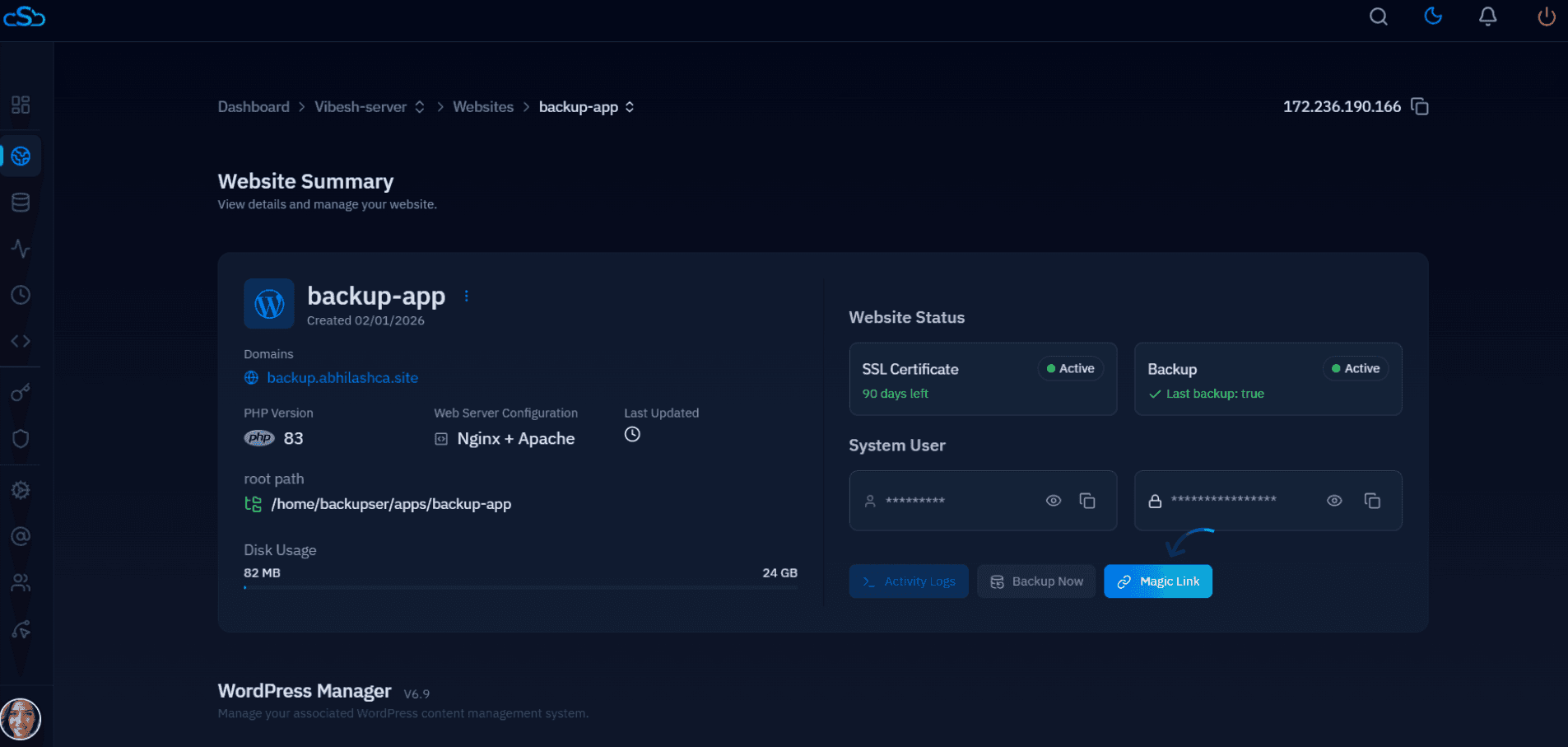
CloudStick already provisions this way by default: each site gets its own system user, its own PHP-FPM pool and socket, and its own docroot under `/home/<user>/apps/<site>/`, so a plugin bug on one WooCommerce install can't reach across to another site's files even on a shared server.
Disable Dangerous PHP Functions
Disabling shell-execution functions in php.ini closes off the most common privilege-escalation step after a plugin or theme vulnerability is exploited, because almost no legitimate WooCommerce or WordPress code needs to spawn an OS-level process.
Set `disable_functions = exec,shell_exec,system,passthru,proc_open,popen,pcntl_exec` in the site's PHP-FPM pool php.ini (or per-pool with `php_admin_value[disable_functions]`), and restart the pool for the change to take effect. This does not break WooCommerce checkout flows, since those rely on outbound HTTP calls, not shell execution.
Leave `curl_exec`, `curl_multi_exec`, and `fsockopen` enabled — payment gateways such as Stripe and PayPal communicate with your server over outbound cURL requests, and disabling them will silently break order processing rather than improve security.
Scope Database Privileges Per Site
Each WooCommerce install should connect through a MySQL user that is scoped to only that site's database, because a shared `GRANT ALL` account turns any single leaked wp-config.php into read/write access over every store's `wp_wc_orders`, `wp_usermeta`, and customer address data on the server.
Create the user with a narrow grant instead of the default wide-open account: `GRANT SELECT, INSERT, UPDATE, DELETE, CREATE, ALTER, INDEX, DROP ON store_db.* TO 'store_user'@'localhost';` followed by `FLUSH PRIVILEGES;`. This still lets WordPress core and WooCommerce run schema updates during plugin upgrades, but it can't touch another database on the same MariaDB instance, and it has no `GRANT OPTION`, `SUPER`, or `FILE` privilege that could be abused to read arbitrary files off disk.
CloudStick's Visual Database Manager creates this one-database, one-scoped-user pairing by default when you provision a site, so you get the isolation without hand-writing GRANT statements over SSH.
Never Store Raw Card Data
A WooCommerce server should never see, log, or store a raw card number, CVV, or magnetic-stripe track, because doing so pulls your entire server into PCI DSS scope with obligations most merchants aren't equipped to maintain.
Modern payment gateways such as Stripe, PayPal, and Authorize.net collect card details through hosted iframes or client-side tokenization (Stripe Elements, PayPal's hosted fields) so the primary account number is sent directly from the customer's browser to the processor and never transits your PHP application at all. WooCommerce only ever stores the resulting token — a value like a Stripe `pm_` or `cus_` ID in postmeta — which is useless to an attacker without the corresponding gateway account. Building a custom checkout that posts raw card fields to your own server, or logging request bodies that include card data for debugging, is what turns a routine security incident into a PCI compliance breach.
If your database, PHP error logs, or wp-content/uploads directory ever contain full card numbers or CVV values, your server falls into PCI DSS scope — that means mandatory quarterly ASV network scans, a Self-Assessment Questionnaire (or a full audit at high volume), and ongoing compliance overhead. Relying on gateway tokenization instead of a custom card form keeps that scope off your infrastructure entirely.
Lock Down wp-config.php Permissions
Restricting wp-config.php so only that site's own system user can read it is the last line of defense if every other control above still leaves an opening, since a stray world-readable file permission is often the actual difference between a contained plugin bug and a full database credential leak.
From the site's app directory, tighten ownership and permissions so the file is owned by the site's dedicated user and unreadable by any other account on the box:
640 permissions let the owning PHP-FPM process read the file and let a system administrator with group access read it for support, while blocking every other site's PHP-FPM user and any unprivileged shell account from opening it directly. Where the hosting layout allows it, moving wp-config.php one directory above the public web root removes it from the docroot entirely, so a misconfigured server block can never serve it as plain text.
Taken together — forced HTTPS, per-site PHP-FPM isolation, a trimmed disable_functions list, scoped database grants, gateway-side tokenization instead of stored card data, and locked-down file permissions — these six controls cover the layers an attacker actually walks through to reach a customer record. Work down this list one server at a time, starting with whichever WooCommerce install handles the most order volume.