How to Set Up Laravel Horizon for Queue Monitoring

%203.png&w=256&q=75)
Horizon only works with Redis queues
Laravel Horizon monitors exactly one queue driver: Redis. If your application currently pushes jobs through the database, SQS, or Beanstalkd driver, Horizon will not see them — switching to Redis is step zero, not an optional optimization. In exchange for that constraint, Horizon replaces your hand-managed fleet of queue:work processes with a single master process that spawns workers, balances them across queues, and streams live metrics — throughput, wait time, runtime, failure counts — to a built-in dashboard at /horizon.
The prerequisites are short: set QUEUE_CONNECTION=redis in your .env, make sure the phpredis extension is loaded (or install the predis/predis Composer package instead), and confirm Redis itself is reachable at the host and port defined in config/database.php — for a single-server deployment that is 127.0.0.1:6379, which the default Laravel config already assumes.
If your server is managed by CloudStick, the Redis part is already done: Redis runs as a system service on every CloudStick-provisioned server out of the box, so there is nothing to install — point your .env at 127.0.0.1 and move on to installing the package.
Install Horizon and publish its assets
Two commands install Horizon: one pulls the package, the other publishes its configuration, dashboard assets, and a service provider into your application.
The horizon:install step creates config/horizon.php, registers app/Providers/HorizonServiceProvider.php, and copies the dashboard assets to public/vendor/horizon. Running php artisan horizon in a terminal starts the master process in the foreground — useful for a first smoke test, since you can dispatch a job and watch it flow through the dashboard immediately. One maintenance note: whenever you upgrade Horizon, re-run php artisan horizon:publish so the dashboard assets match the new package version. The Horizon docs suggest adding that command to the post-update-cmd script in composer.json so it happens automatically.
Configure environments and balance strategies
The environments array in config/horizon.php is where all the real decisions live. Each environment (production, local) contains one or more supervisor definitions — supervisor-1 by default — and each supervisor is a named pool of worker processes with its own queues, scaling rules, and timeouts.
The balance option decides how workers are shared between the queues in the list. With simple, Horizon splits processes evenly between queues and keeps the split fixed. With auto, Horizon shifts workers toward whichever queue is busiest — using either expected wait time ('autoScalingStrategy' set to 'time') or raw job count ('size') — scaling the pool between minProcesses and maxProcesses as load changes. Setting balance to false disables balancing entirely: queues are drained in the order they appear, exactly like a plain queue:work command.
For most production apps, auto with a conservative maxProcesses is the right starting point. Remember that maxProcesses is a per-supervisor total across all its queues, and every worker is a full PHP process holding your app in memory — on a 4 GB VPS, ten workers at 80–120 MB each is a meaningful slice of RAM, so size the ceiling against what the server actually has.
Run Horizon under Supervisor
In production, Horizon must run as a daemon that restarts automatically after a crash or reboot, and Supervisor is the standard tool for that. The key difference from a classic queue:work setup: you run exactly one horizon process. Horizon manages its own pool of workers internally, so numprocs stays at 1 — running two Horizon masters against the same Redis instance just doubles your workers unpredictably.
stopwaitsecs must be longer than your longest-running job. When Supervisor stops Horizon, it waits this many seconds for a graceful exit before sending SIGKILL — and a SIGKILL mid-job means the job is cut off and lost or retried in a half-finished state. The value of 3600 above matches the Horizon documentation default.
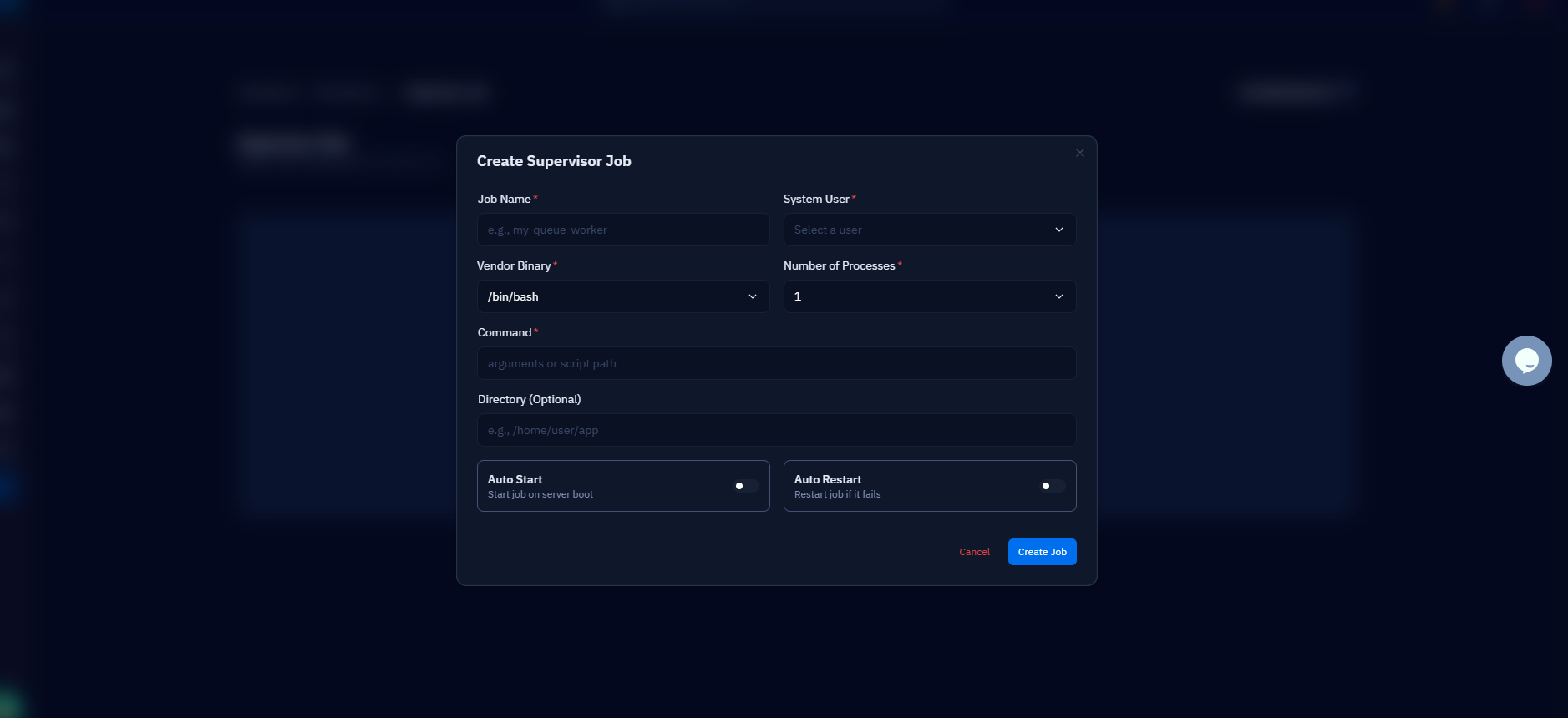
On a CloudStick server you can skip writing this file over SSH entirely: the Supervisord Management screen in the server panel lets you define the horizon program — command, user, log path, stop wait time — from the dashboard, and CloudStick writes the config and reloads Supervisor for you.
Secure the /horizon dashboard
By default, Horizon only allows dashboard access in the local environment — in production, every visitor gets a 403 until you say otherwise. Access is controlled by the viewHorizon gate defined in app/Providers/HorizonServiceProvider.php, and the usual pattern is an allowlist of admin emails or a role check on the authenticated user.
Because the gate receives the authenticated user, visitors must be logged in through your app's normal auth before the check even runs — an anonymous request never reaches the allowlist. If your app has roles or permissions, return a check like $user->isAdmin() instead of hardcoding emails; the gate is ordinary Laravel authorization, so anything you can express in a closure works. Do not be tempted to open the gate wide: the dashboard exposes job payloads, exception traces, and queue names, all of which are useful to an attacker.
Schedule snapshots and monitor failed jobs
The Metrics tab stays empty until you schedule php artisan horizon:snapshot — Horizon only records throughput and runtime graphs when this command captures a data point, and the documented cadence is every five minutes. In Laravel 11 and 12 the cleanest way is the scheduler, which needs just one entry plus the standard scheduler crontab line.
Whichever route you choose, the crontab itself is where mistakes creep in — wrong user, wrong PHP binary, no logging. CloudStick's CronJobs UI removes that class of error: add the snapshot entry (or the scheduler's schedule:run entry) from the website's CronJobs screen, pick the every-five-minutes preset, and it is written to the site user's crontab correctly.
Failed jobs are where Horizon pays for itself day to day. The Failed Jobs tab lists every failure with the full exception trace, the job's payload, and its tags — and each entry has a Retry button, so re-running a job after you have fixed the bug is one click instead of hunting through php artisan queue:failed IDs. Tag your important jobs (Horizon auto-tags Eloquent models attached to a job) and you can search failures by customer or order rather than scrolling a raw list.
Do not rely on checking the dashboard to notice failures. Horizon can push a notification when a queue's wait time crosses a threshold: call Horizon::routeSlackNotificationsTo() or routeMailNotificationsTo() in your HorizonServiceProvider's boot method, and tune the thresholds in the waits array of config/horizon.php. A Slack ping about a backed-up queue beats a customer email about a missing receipt.
Restart Horizon on every deploy
Horizon workers are long-lived PHP processes, so they keep serving the code that was on disk when they booted — deploy new code without restarting them and your queue silently runs the old version. The fix is one line in your deploy script: php artisan horizon:terminate. It tells Horizon to finish the jobs currently in flight, then exit cleanly; Supervisor sees the process stop and immediately starts a fresh one that boots your new code. Nothing is killed mid-job, and the worker pool is never down for more than a moment.
That completes the production checklist. To recap the whole setup: queues on the Redis driver; laravel/horizon installed with its config and provider published; supervisor-1 tuned with a balance strategy and a maxProcesses ceiling the server can afford; one Horizon process kept alive by Supervisor with a generous stopwaitsecs; the /horizon dashboard locked behind the viewHorizon gate; horizon:snapshot on a five-minute schedule; and horizon:terminate wired into every deploy.
From here, dispatch a burst of test jobs and watch the dashboard: confirm auto-balancing shifts workers where you expect, force a failure to verify it lands in the Failed Jobs tab with a usable trace, and run one full deploy to prove the terminate-and-restart cycle works before real traffic depends on it.

