How to Set Up Laravel Queues and Workers in Production


%203.png&w=256&q=75)
Why the sync driver fails in production
Laravel ships with QUEUE_CONNECTION=sync, which means every job you dispatch runs immediately, inside the same HTTP request that triggered it. Nothing is actually queued. The user who submits your signup form sits waiting while the welcome email sends, the PDF renders, and the third-party API call times out and retries — all before they see a response.
In production that has three concrete failure modes. First, response times: any job over a few hundred milliseconds directly inflates page load. Second, timeouts: PHP-FPM pools typically enforce max_execution_time of 30 seconds, so a slow mail server or a large export kills the request outright and the user sees a 500. Third, no retries: if the job throws, the work is simply lost — there is no failed-jobs record and no second attempt.
The fix is a real queue backend plus one or more long-running worker processes that consume jobs outside the request cycle. The rest of this guide sets that up on a standard Ubuntu 22.04/24.04 VPS running Nginx, PHP 8.3, and Laravel 11 or 12.
Choosing between the database and Redis drivers
Use the database driver for modest workloads and Redis for anything busy. The database driver needs zero extra infrastructure — Laravel 11 and 12 ship the jobs, job_batches, and failed_jobs tables in the default migrations, so if you have run php artisan migrate, the tables already exist. It is a fine choice up to a few thousand jobs per hour, but every worker polls the table, which adds MySQL load and lock contention as you scale.
Redis keeps the queue in memory, handles high throughput without touching your database, and is required if you plan to add Laravel Horizon for monitoring later. You need the phpredis extension (or the predis Composer package) and a running Redis server. Set the connection in .env:
On a CloudStick-managed server both paths are short: Redis is already installed as part of the standard stack, and the phpredis extension can be added to your PHP version from the dashboard with EasyPHP instead of compiling it by hand. Remember to re-run config:cache after any .env change, or the running config cache will keep the old driver.
Running queue:work vs queue:listen
Always run queue:work in production. It boots the framework once, keeps the application in memory, and processes jobs in a tight loop — which is exactly why it is fast, and also why it will not notice new code until it restarts. queue:listen re-bootstraps the entire framework for every single job, so it picks up code changes automatically but pays a heavy per-job cost. It is a development convenience, not a production tool.
The flags matter: --sleep=3 pauses three seconds when the queue is empty, --tries=3 attempts each job three times before marking it failed, and --max-time=3600 makes the worker exit cleanly after an hour so any slow memory leak resets instead of accumulating. Run this command manually once to confirm jobs flow — but do not leave it running in an SSH session, because it dies the moment you disconnect. That is what the next section solves.
Keep workers alive with Supervisor
Supervisor is the standard process manager for Laravel workers: it starts them at boot, restarts them when they exit or crash, and runs as many parallel copies as you ask for. Install it with apt, then define one program per worker pool in /etc/supervisor/conf.d:
Three directives deserve attention. numprocs=4 runs four parallel workers — start with two to four and scale with your job volume and CPU count. autorestart=true is what makes --max-time safe: the worker exits after an hour and Supervisor immediately replaces it. stopwaitsecs=3600 tells Supervisor to wait up to an hour for a worker to finish its current job before force-killing it; set it longer than your slowest job or Supervisor will SIGKILL jobs mid-flight. Also run workers as your site user (user=appuser), never root.
If stopwaitsecs is shorter than your longest-running job, Supervisor will kill the process mid-job during every restart and deploy. The job is then retried from scratch — or lost, if it already consumed its tries. Measure your slowest job and add headroom.
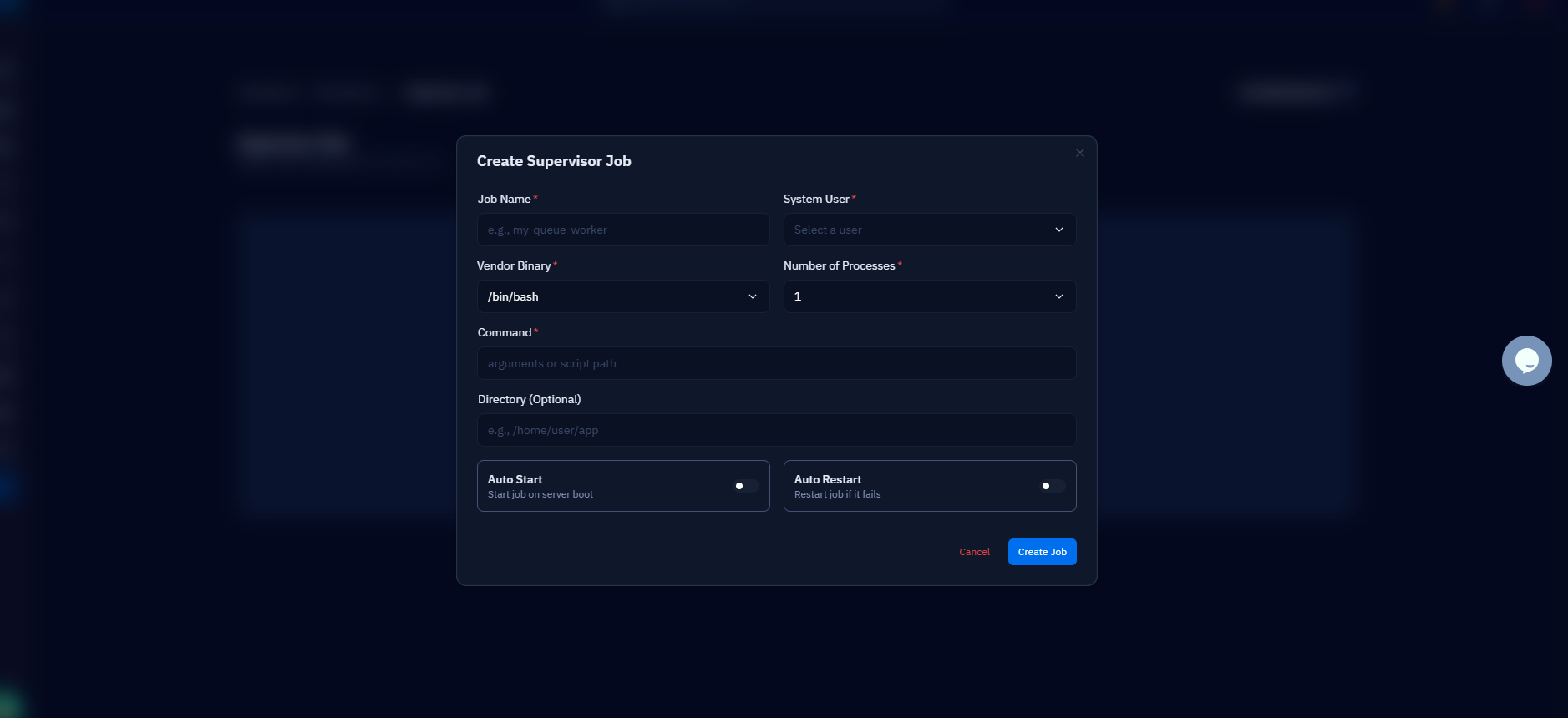
If your server is connected to CloudStick, you can skip the config file entirely: the dashboard's Supervisord Management feature creates, edits, and restarts worker programs from the UI — you fill in the command, user, and process count, and CloudStick writes and reloads the Supervisor config on the server without you opening SSH.
Restart workers on every deploy
Because queue:work holds your application in memory, deployed code changes do not reach the workers until they restart — a worker started last Tuesday is still executing last Tuesday's job classes. The clean fix is one command at the end of every deploy:
This does not kill anything. It writes a timestamp to your cache, and each worker checks it between jobs: any worker started before the timestamp finishes its current job, then exits gracefully. Supervisor's autorestart brings up fresh processes running the new code. Because the signal travels through the cache, your CACHE_STORE must be a real shared store such as redis or database — not array.
Put php artisan queue:restart in your deployment script itself — right after composer install and the migrate/config:cache steps — rather than trusting yourself to run it by hand. If you deploy through CloudStick's Git Deployment, add it to the deploy script there so every push restarts workers automatically.
Handle failed jobs before they pile up
A job that exhausts its tries lands in the failed_jobs table with its full payload and exception, so nothing is silently lost — but nothing retries itself either. Someone has to look. The artisan commands cover the whole lifecycle:
queue:retry pushes a failed job back onto the queue by its UUID (or all of them with --all), and queue:flush clears the table once you have dealt with the fallout. For anything beyond occasional failures, wire up alerting: define a failed() method on critical job classes to notify your team, and check the table during deploys — a sudden spike in failed_jobs right after a release is usually the release's fault, and queue:retry --all after a hotfix recovers every affected job.
Your production queue checklist
The complete setup is five decisions, each covered above: switch QUEUE_CONNECTION off sync to database or redis and re-cache the config; run queue:work (never queue:listen) with explicit --tries and --max-time flags; put the workers under Supervisor with numprocs sized to your load, stopwaitsecs longer than your slowest job, and autorestart enabled; add queue:restart to the end of your deploy script so workers always run current code; and review failed_jobs regularly with queue:failed and queue:retry.
Verify the whole chain end to end once: dispatch a test job, watch it complete in the worker log, kill a worker process and confirm Supervisor revives it, then deploy a trivial change and confirm the workers restarted. Ten minutes of verification now saves you from discovering a dead worker pool through a customer asking where their export went.
From here, two natural next steps: if you chose Redis, add Laravel Horizon for a live dashboard of throughput and failures, and move your scheduled tasks onto the Laravel scheduler with a single cron entry — both are covered in the related guides below.

