CloudStick vs cPanel: A Lightweight Alternative Without the Bloat

%203.png&w=256&q=75)
Why Developers Leave cPanel
For nearly two decades, cPanel was the default answer to "how do I manage a web server." It offered a graphical interface on top of Linux, made email accounts and FTP easy, and became the standard bundled with shared and reseller hosting. Millions of websites were built on cPanel-managed servers, and entire hosting businesses were built around it.
But starting in 2019, cPanel's pricing changed dramatically. After Oakley Capital acquired the company, cPanel moved from a flat server license to a per-account pricing model. The change hit agencies and resellers hardest. A hosting provider managing 200 cPanel accounts suddenly saw their monthly licensing bill jump from a fixed $20–30/month to $40–60/month or more. For larger operations, costs climbed into the hundreds.
Beyond pricing, developers began noticing what had always been true but was now harder to ignore: cPanel is heavy software. It installs dozens of daemons, processes, and background services on your server. The interface, while familiar, hasn't fundamentally changed in appearance or workflow since the early 2000s. Managing a modern PHP stack or deploying a Node.js application through cPanel feels like threading a needle with oven mitts.
The search for alternatives accelerated. Developers wanted something that handled the same core jobs — DNS, email, SSL, databases, FTP — without the legacy overhead, the per-account billing model, and the UI that looked like it was designed for Internet Explorer 6.
CloudStick was built for exactly this transition. It is a modern SaaS control panel that connects to your server via SSH, installs a lightweight management agent, and gives you a clean dashboard to manage everything cPanel handles — without the bloat, without the per-account fees, and without decades of accumulated technical debt in the codebase.
Pricing: Per-Account vs Flat-Rate
cPanel's current pricing model charges per cPanel account — meaning every website or client you host on that server adds to your monthly bill. The base license starts at around $20/month for the first five accounts, then adds approximately $0.10–$0.20 per additional account per month. For an agency hosting 50 sites across a few servers, you are looking at $200+ per month in cPanel licensing alone, before you pay a dollar for the servers themselves.
CloudStick operates on an entirely different model: flat per-server pricing, unlimited websites on all paid plans. You pay one flat rate regardless of how many sites you host on a server.
CloudStick's plans break down as follows: Basic at $9/month covers one server with unlimited websites. Pro at $19/month covers unlimited servers — the plan most agencies settle on. Business at $49/month adds white-labeling, WordPress Magic Link, and WordPress Templates on top of unlimited servers.
The savings compound as your agency grows. With cPanel, every new client you onboard increases your licensing cost. With CloudStick, adding a new site costs nothing additional — it only affects the server's own resources (CPU, RAM, disk), which is the natural cost you would pay regardless of which control panel you use.
This flat pricing model is particularly valuable for resellers and agencies who monetize by charging clients a monthly hosting fee. With cPanel eating into margins on a per-account basis, profitability erodes with scale. CloudStick inverts that dynamic — your hosting margins improve as you add more sites, because the panel cost stays constant.
Resource Usage & Performance
cPanel is not a lightweight piece of software. A fresh cPanel/WHM installation on a VPS consumes roughly 2GB of RAM just for the panel processes before a single website is hosted. cPanel runs a substantial number of daemons continuously: cpsrvd (the main process), cpdavd (WebDAV), cpgreylistd (email greylisting), cphulkd (brute force protection), tailwatchd (log monitoring), and more. These background processes compete with your web applications for server resources.
On a 2GB RAM VPS — a common starting point for developers — cPanel leaves very little headroom for actual web traffic. In practice, cPanel recommends at least 2GB RAM as a minimum and performs better on 4GB or more, meaning you are provisioning server resources primarily to run the control panel itself rather than to serve your applications.
CloudStick's architecture is fundamentally different. The CloudStick agent (a single Go binary under 15MB) connects to the CloudStick SaaS backend and executes management commands on the server. There is no constantly-running web interface process on your server consuming RAM. When you are not actively managing the server through the dashboard, the agent's resource footprint is minimal. The freed memory goes to your web stack — Nginx, PHP-FPM, MySQL, Redis — the processes actually serving your users.
CloudStick also installs its own custom-compiled Nginx (nginx-cs) and PHP-FPM binaries — completely separate from system packages — meaning upgrades happen through the CloudStick agent without touching system apt packages. Each site runs in an isolated PHP-FPM pool with its own system user, open_basedir restriction, and disabled dangerous functions. The Nginx + PHP-FPM + MariaDB stack CloudStick deploys is lean and production-ready from first boot.
If you are migrating from cPanel, start with a fresh CloudStick server on a 2GB VPS from Hetzner or DigitalOcean. Because CloudStick's agent overhead is minimal, a 2GB server can comfortably run 5–10 small WordPress sites with room to spare — something a cPanel server of the same size would struggle with. You will often be able to use a smaller (cheaper) server than you needed under cPanel.
Feature Coverage
The concern developers most often raise when leaving cPanel is whether an alternative covers the same range of features. cPanel's longevity means it has accumulated a broad set of tools. Let's address the core areas directly.
DNS management: CloudStick integrates directly with Cloudflare's API to manage DNS records — A, AAAA, CNAME, MX, TXT, SPF, DKIM, DMARC — from the dashboard. You can point a domain and have CloudStick configure the full DNS zone automatically. For servers not behind Cloudflare, manual DNS records are manageable through the interface as well.
Email hosting: CloudStick sets up professional email on your server, manages mailboxes from the dashboard, and handles DNS records (MX, SPF, DKIM, DMARC) automatically. Email is available on all paid plans starting with Basic. This is a significant parity point — cPanel's email hosting is one of the reasons many hosting businesses stuck with it for so long.
SSL certificates: Free Let's Encrypt SSL is available on all paid plans, with auto-renewal handled automatically. Wildcard SSL certificates and custom SSL installation (for paid certificates) are both supported. SSL provisioning and renewal is a zero-touch process — set it once and CloudStick handles the rest.
Databases: CloudStick includes a visual database manager — no phpMyAdmin required, no command line. Create MySQL databases, manage users, assign permissions, and run queries all from the dashboard. Per-database backup with configurable schedules and retention periods is built in.
File management: The Advanced File Manager (available on Basic and above) handles file uploads, editing, permissions, and directory management without requiring FTP or SSH. For FTP access, CloudStick supports both SFTP (all plans) and FTP (Basic and above) using Pure-FTPd.
Backups: Automated server and website backups with configurable schedules, retention periods, and free backup storage (4GB on Basic, 10GB on Pro, 40GB on Business). Archived backups are browsable and restorable from the dashboard. Additional storage can be purchased using account credit.
Firewall and security: CSF (ConfigServer Security & Firewall) comes pre-configured on every CloudStick server. SSH key management is built in, with password login disabled after server setup. Fail2ban rules, IP whitelisting, and server hardening are applied automatically at installation.
The honest assessment: CloudStick covers every core feature that the majority of developers and agencies actually use in cPanel. Where cPanel has breadth through decades of feature accumulation, CloudStick has depth in the features that matter most — and it delivers them through an interface that does not require navigating twenty sub-menus to find a setting.
Modern Workflow vs Legacy UI
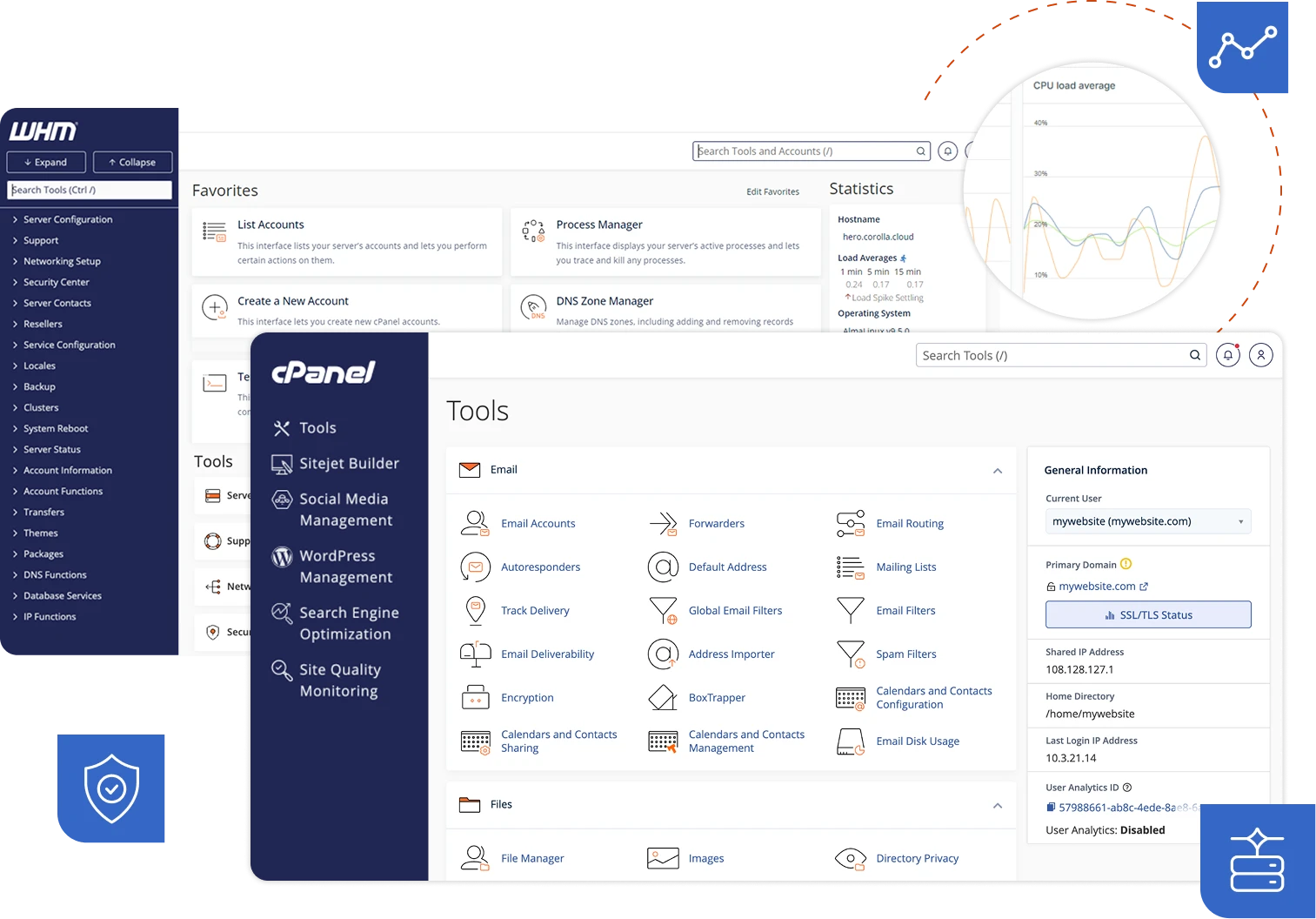
cPanel's interface is functional but frozen in time. The current cPanel version still presents a dense grid of icons organized into categories like "Files," "Databases," "Domains," and "Email." Navigating between functions requires drilling through multiple pages. Creating a new website involves configuring separate zones across Domains, DNS Zone Editor, File Manager, and MySQL databases — workflows that a developer must learn through experience rather than intuition.
WHM — the server-level administration panel that sits above cPanel — adds another layer of complexity. Managing multiple clients means switching between WHM for server-level settings and cPanel for site-level settings. It is a two-panel architecture that made sense in 2005 when shared hosting was the dominant model, but feels cumbersome for modern agency workflows where a single developer might manage fifty independent VPS instances rather than one shared server.
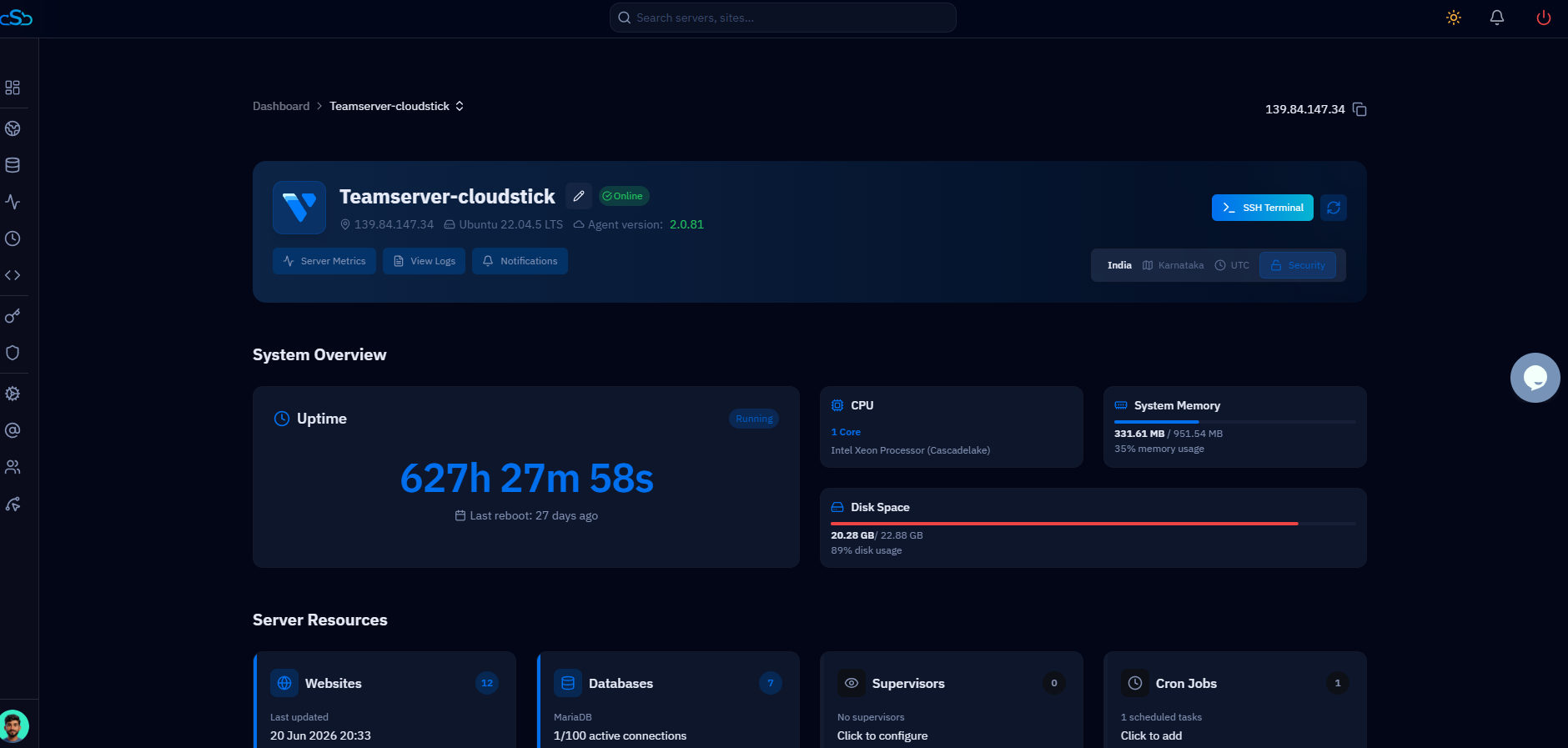
CloudStick is built as a SaaS product designed for how developers actually work in 2026. The dashboard shows all your connected servers in one view. Clicking into a server opens a left-navigation sidebar with clear sections: Websites, Databases, Backups, Firewall, SSH, CronJobs, Email, and more. Creating a new WordPress site takes under two minutes — add the domain, select the PHP version, check the WordPress install option, and CloudStick provisions the entire stack including the database, system user, Nginx vhost, PHP-FPM pool, and Let's Encrypt certificate.
Features like Git deployment, Supervisor job management for Node.js or Laravel queue workers, environment variable management, and one-click site cloning are built directly into the site workflow — capabilities cPanel either doesn't have or requires third-party plugins to achieve. The Business plan adds WordPress Magic Link (instant admin access without a password) and WordPress Templates (deploy pre-configured site setups), features that simply do not exist in the cPanel ecosystem.
Team collaboration is another area where CloudStick's modern design shows. Role-based access control lets you invite team members and control which servers and websites they can access. cPanel's multi-user model is built around reseller accounts and subaccounts — useful for hosting providers, but awkward for development teams where everyone needs different access levels across a shared infrastructure.
Making the Switch
Migrating from cPanel to CloudStick is a server-level migration, not a like-for-like panel swap. You are not reinstalling CloudStick on the same cPanel server — you provision a new VPS, connect it to CloudStick, and migrate your sites across. This is actually an advantage in disguise: the migration is an opportunity to clean up years of accumulated configuration, remove unused software, and start with a lean, properly configured stack.
The migration process for WordPress sites is straightforward. CloudStick's WordPress Manager supports direct migration from cPanel hosts — transfer the database, upload the files via SFTP or the Advanced File Manager, update the wp-config.php database credentials, and point the domain. CloudStick handles SSL issuance automatically once the domain resolves to the new server.
For agencies managing many sites, the migration can be phased: start by connecting a new CloudStick server and migrating one or two sites to validate the process, then work through the remaining sites over the following weeks while keeping the cPanel server running in parallel. Once all sites are confirmed live on CloudStick, the old cPanel license can be cancelled.
CloudStick offers a 7-day free trial on all plans — enough time to connect a server, migrate a test site, and validate the full workflow before committing. The Basic plan at $9/month (one server, unlimited sites) is a low-risk entry point for developers who want to evaluate CloudStick against their existing cPanel workflow.
The bottom line: if you are paying more than $50/month in cPanel licensing, the math for switching to CloudStick is compelling. If your cPanel bill is below that threshold, the move still makes sense for the performance gains, the modern workflow, and the confidence that your licensing costs will not increase as you grow. cPanel's pricing model actively penalizes growth. CloudStick's does not.

