Cron Syntax Explained with Real Examples

%203.png&w=256&q=75)
The five fields explained
Every crontab line is five time fields followed by a command, in this fixed order: minute, hour, day of month, month, and day of week. That is the entire grammar — everything else in cron syntax is shorthand for filling those five slots. The fields accept minute values 0 through 59, hours 0 through 23, days of the month 1 through 31, months 1 through 12, and days of the week 0 through 7, where both 0 and 7 mean Sunday. A job runs at any minute where all the time fields match the current time:
Read that example right to left if it helps: run the command on every day of the week, in every month, on every day of the month, at hour 2, at minute 30 — in other words, every day at 02:30. Cron evaluates the schedule in the server's local timezone, checks it once per minute, and one minute is the finest granularity it offers. If you need sub-minute scheduling, cron is the wrong tool.
Special characters and step values
Four characters do all the heavy lifting. The asterisk means "every value" — an asterisk in the hour field matches all 24 hours. The comma builds lists: 0,30 in the minute field fires at the top and bottom of the hour, and 1,15 in the day-of-month field fires on the 1st and 15th. The hyphen builds ranges: 1-5 in the day-of-week field means Monday through Friday, and 9-17 in the hour field covers business hours. Ranges and lists combine freely, so 8-11,13-16 is a perfectly legal hour field.
The slash adds step values, and it is the character people misread most. */5 in the minute field means "every value divisible by the step starting from zero" — minutes 0, 5, 10, and so on — not "five minutes after the job last finished". Steps also apply to ranges: 0-30/10 in the minute field fires at minutes 0, 10, 20, and 30, then stays quiet for the rest of the hour. Month and day-of-week fields additionally accept three-letter names such as JAN, DEC, MON, and FRI, which read better than numbers and remove any ambiguity about whether months start at zero (they do not — January is 1).
The day-of-week OR gotcha
Here is the rule that surprises even experienced admins: when both the day-of-month field and the day-of-week field are restricted — meaning neither is an asterisk — cron runs the job when either one matches, not when both do. The schedule 0 9 13 * 5 does not mean "9am on Friday the 13th". It means 9am on the 13th of every month and 9am on every Friday. Over a typical month that is five or six runs instead of the zero-or-one you probably intended.
When day-of-month and day-of-week are both restricted, cron treats them as OR, not AND. Any schedule that fills in both fields deserves a second look — it almost never does what its author intended.
The practical fix is to restrict only one of the two fields and enforce the other inside the command itself. For a true "Friday the 13th" job, schedule 0 9 13 * * and start the command with a date test that exits early unless today is Friday. It is one extra clause in the crontab line, and it converts an OR you did not want into the AND you did.
@reboot, @daily, and other shortcuts
Cron ships named shortcuts that replace all five fields: @hourly is 0 * * * *, @daily (and its synonym @midnight) is 0 0 * * *, @weekly is 0 0 * * 0, @monthly is 0 0 1 * *, and @yearly is 0 0 1 1 *. They are easier to read at a glance and harder to typo, which makes them a good default for jobs where the exact minute genuinely does not matter.
Two caveats keep the shortcuts honest. First, @reboot is the odd one out: it runs once when the cron daemon starts, not on a timer — useful for starting a lightweight worker or writing a boot marker, but remember it also fires when the cron service itself is restarted, not only on a full server boot. Second, every @daily job on the server fires at exactly 00:00, so a machine full of them takes a synchronized load spike at midnight. When you care about spreading load, write the five fields yourself and pick an uncommon minute — 17 3 * * * draws far less company than 0 0 * * *.
Real examples you can copy
These five schedules cover the majority of real-world jobs on a web server. Each line works as-is on Ubuntu 24.04 and Debian — swap in your own script path and adjust the times to your quiet hours:
Notice the patterns rather than memorizing the lines: a step in the minute field for high-frequency checks, a weekday range for business-hours work, a specific day-of-month for monthly billing, a single day-of-week for weekly maintenance, and a comma list for twice-daily syncs. Between those five shapes and an asterisk, you can express almost any schedule a web server needs. Always give the command an absolute path — cron's PATH is minimal, and relying on it is the top cause of jobs that work in your shell but not in cron.
Common mistakes and your next step
Three mistakes account for most broken schedules. First, */60 in the minute field: minutes only go up to 59, so some cron implementations reject the line and others quietly treat it as minute 0 — write 0 * * * * for hourly and the intent is unambiguous. Second, 0 0 31 * * as a "monthly" job: only seven months have a 31st, so the job silently skips February, April, June, September, and November — use 0 0 1 * * or @monthly instead. Third, the Sunday confusion: both 0 and 7 mean Sunday in modern crons, but some older or stricter implementations only accept 0 through 6, so 0 is the portable choice. And remember two crontab quirks while you are editing: a percent sign in the command must be escaped with a backslash because cron treats a bare one as a newline, and the file must end with a newline or the last line may be ignored entirely.
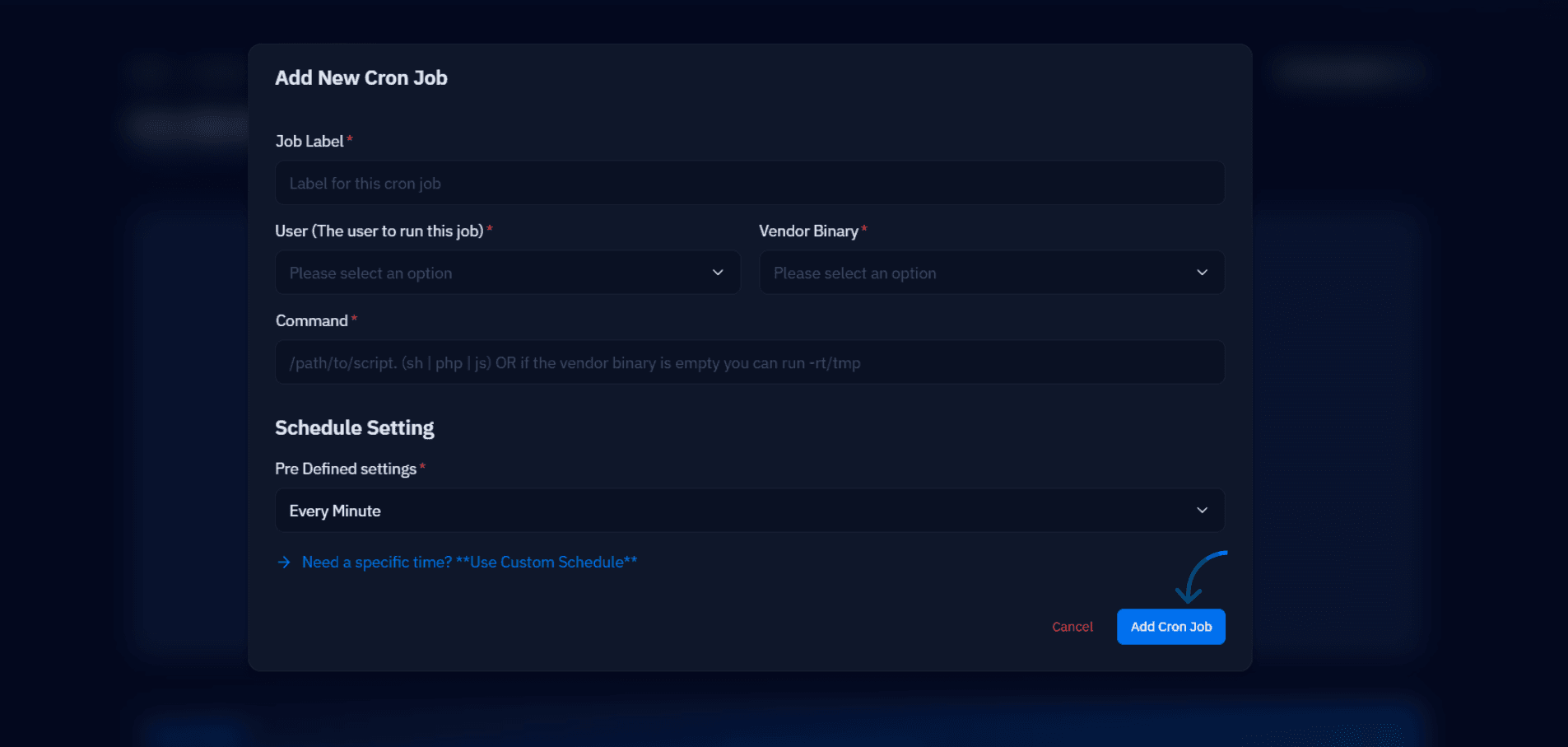
Your next step is to pressure-test before you deploy: paste any schedule into crontab.guru and read back the plain-English translation — it catches OR gotchas, impossible dates, and misread steps in seconds. Then put the line in place and verify the first real run in the logs with grep CRON /var/log/syslog. If you manage servers through CloudStick, you can skip hand-writing the fields altogether: the CronJobs manager in the dashboard, available on every plan, builds the schedule for each website from readable options and saves the entry for you — the syntax above is still worth knowing, because it is exactly what gets written on your behalf.

