How to Send Yourself Alerts When a Cron Job Fails

%203.png&w=256&q=75)
Silent failures are the real danger
A cron job that fails makes no sound. Cron does not retry, does not escalate, and does not put anything on your screen — it simply moves on to the next scheduled run. That is why the most common backup horror story is not "the backup script had a bug" but "the backup script had been failing for four months and nobody knew." The failure itself is rarely the disaster; the silence around it is.
A cron job can fail in two distinct ways: it runs and exits with an error, or it never runs at all — because cron stopped, the crontab was wiped, or the server was down at the scheduled minute. Exit-code alerting only catches the first kind. If your monitoring cannot detect a job that silently never fired, you are only half covered.
This guide builds alerting in layers: cron's built-in mail, a wrapper script that reports non-zero exit codes to a webhook, and finally a dead man's switch that notices when a job stops running entirely. Each layer takes minutes to add, and together they cover both failure modes.
How cron's built-in MAILTO actually works
Cron already has an alerting mechanism: any output a job writes to stdout or stderr is mailed to the crontab's owner. Set a MAILTO variable at the top of your crontab and cron addresses that mail wherever you choose:
The catch is the word "mailed." Cron hands the message to the local mail system, and on a modern Ubuntu 24.04 or Debian VPS there usually is none — no MTA is installed by default, so the mail is silently discarded. Even if you install Postfix, mail sent straight from a residential-grade VPS IP lands in spam or is rejected outright by Gmail and Outlook. You can make MAILTO work reliably by configuring an SMTP relay (an authenticated smarthost through a transactional provider), but at that point you have done more setup than the webhook approach below requires.
MAILTO also alerts on any output, not on failure — a chatty script that succeeds still generates mail every run, which trains you to ignore the messages. Treat MAILTO as a useful default on servers that already have working mail, not as your primary alarm.
Wrapper scripts that catch failures
The most portable pattern is a wrapper: run the real job, check its exit code, and fire a notification only when the code is non-zero. Every well-behaved Unix program exits 0 on success, so this one check covers almost anything you schedule. Save this as /usr/local/bin/cron-alert:
Make it executable with chmod +x, define WEBHOOK_URL in the crontab, and prefix your jobs: 30 2 * * * /usr/local/bin/cron-alert /usr/local/bin/nightly-backup.sh. The wrapper captures the job's output, logs every run with a timestamp and exit code, and forwards the first 500 characters of output with the alert — usually enough to diagnose the failure from your phone. If you prefer not to write your own, the small utility chronic (from the moreutils package, one apt-get install away) does the "stay quiet unless it failed" part and pairs well with MAILTO.
Webhook alerts to Slack, Discord, or Telegram
Webhooks are the modern replacement for local mail because they need nothing installed beyond curl, they arrive on your phone in seconds, and they cannot land in spam. Slack and Discord both issue an incoming-webhook URL per channel — the JSON payload in the wrapper above is already in Slack's format, and Discord accepts the same idea with a content field instead of text. For Telegram, create a bot with BotFather and call the sendMessage endpoint:
Two practical notes. First, protect the webhook URL like a password — anyone holding it can post to your channel — so keep it in a root-readable file or the crontab itself, not in a world-readable script. Second, if your team lives in email rather than chat, the same wrapper can call a transactional email API over HTTPS instead of a chat webhook; the pattern is identical and still avoids running a local mail server. Whichever channel you pick, send a deliberate test failure (cron-alert false is the quickest) and confirm the message actually arrives before you trust it.
The dead man's switch: catching jobs that never ran
Everything so far assumes the job ran and failed. The scarier case is the job that never ran: the cron daemon died, someone commented the line out, the server rebooted into a broken state, or the crontab was lost in a migration. No exit code exists, so no wrapper can alert on it. The fix is to invert the logic — instead of the server telling you about failure, it pings an external monitor on every success, and the monitor alerts you when the ping stops arriving. That is a dead man's switch.
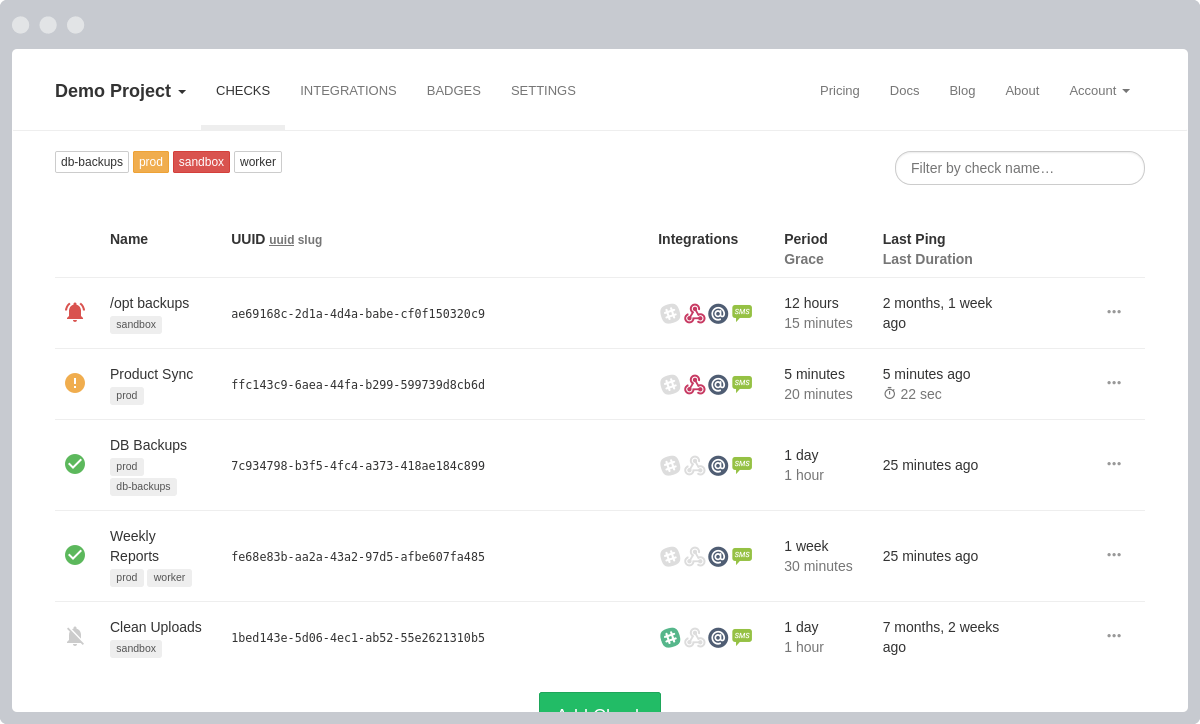
Services built for this (Healthchecks.io is the best-known open-source one, and you can self-host it) give each job a unique ping URL and a schedule with a grace period. Wiring it in is one line appended to the job:
Because of the double ampersand, the ping fires only on success. If the monitor expects a ping daily at 02:30 and none arrives by the end of the grace window, it emails or messages you — catching failed runs, missed runs, dead servers, and deleted crontabs with the same single mechanism. For your two or three genuinely critical jobs, this is the highest-value ten minutes of setup in this article.
Logging, layering, and your next step
Alerts tell you something broke; logs tell you why. Keep both: append each job's output to its own file with a redirect like >> /var/log/nightly-backup.log 2>&1 (or rely on the wrapper's log), and rotate those files with logrotate so they never fill the disk. When an alert wakes you, the log has the stack trace the 500-character webhook snippet cut off.
A sensible rollout order: today, add the wrapper script and a webhook so every job reports failures. This week, register your critical jobs — backups above all — with a dead man's switch so a job that vanishes cannot vanish quietly. Keep MAILTO as a bonus layer if your server already relays mail. If you manage servers through CloudStick, the dashboard's CronJobs manager keeps every scheduled job for a site visible in one list — so a commented-out or missing entry is obvious at a glance — and the built-in server stats show CPU, memory, and disk in real time, which is often the fastest way to spot the resource exhaustion behind a run of failures.
Finish by testing the whole chain, not just the pieces: force a real failure, watch the webhook arrive, then disable the job for a day on a test schedule and confirm the dead man's switch complains. An alerting system you have never seen fire is a hope, not a system.

