How to Set Up Email on Your Own Server

%203.png&w=256&q=75)
What a self-hosted mail stack involves
A working mail server is two programs doing two different jobs. Postfix is the mail transfer agent (MTA): it speaks SMTP to the rest of the internet, accepting messages addressed to your domain on port 25 and handing your outbound mail to Gmail, Outlook, and everyone else. Dovecot is the other half: it stores delivered messages and serves them to your mail client over IMAP (port 993) or POP3, and it handles the login when Thunderbird or your phone asks for the inbox. Postfix moves mail; Dovecot keeps it and shows it to you.
The two share a filesystem: Postfix writes each delivered message into a mailbox directory, and Dovecot reads from the same place — on a CloudStick-managed server, per-site mail lives under /home/<user>/mail/. Around that core sit the supporting pieces this article walks through: DNS records that tell the world where your mail lives and prove you are allowed to send it, open ports, a TLS certificate for the mail hostname, and the mailboxes themselves. Get those right in order and the stack works; skip one and mail silently disappears.
The DNS records that must exist before anything works
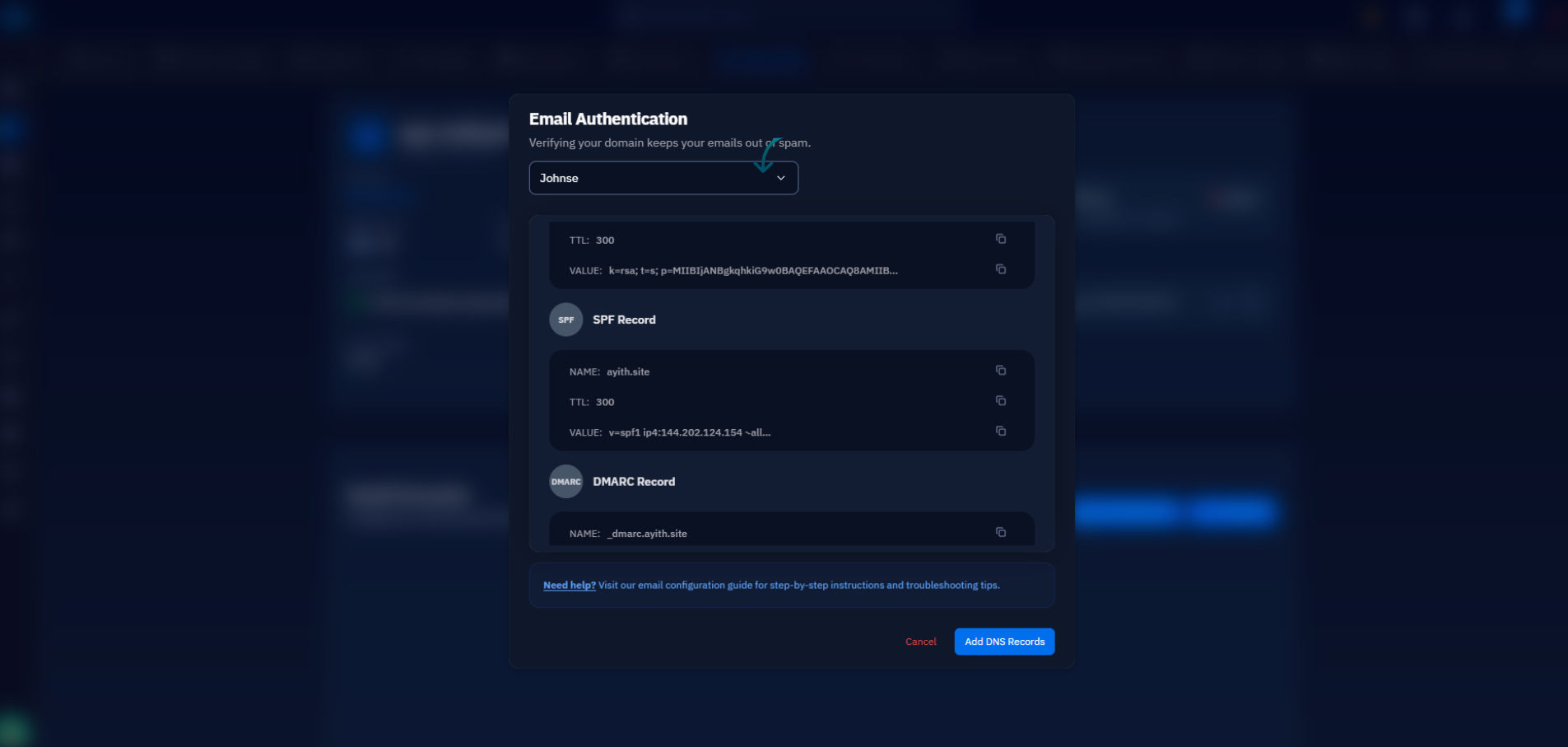
Six records, and every one of them matters. An A record points your mail hostname (mail.example.com) at the server's IP. An MX record on the domain points at that hostname — never directly at an IP. An SPF TXT record lists which servers may send mail for your domain. A DKIM TXT record publishes the public key your server signs outbound mail with, so receivers can verify nothing was forged in transit. A DMARC record tells receivers what to do when SPF or DKIM fail. And reverse DNS — the PTR record mapping your IP back to mail.example.com — is set in your VPS provider's control panel, not at your DNS host; a missing or mismatched PTR is the single most common reason big providers reject self-hosted mail outright.
Before installing anything you need: a VPS with a static public IP, a domain whose DNS you control, the ability to set the PTR record in your provider's panel, and outbound port 25 that is open or unblockable. If your provider will not unblock port 25 under any circumstances, stop here — you can still receive mail, but you cannot deliver it directly, and a different provider or an SMTP relay is the honest answer.
Verify all of it with dig before moving on — forward, reverse, and policy:
The forward A record and the reverse PTR must agree exactly. If dig -x returns your provider's generic hostname (something like static.10.113.0.203.your-vps-host.net), fix it in the provider panel before you send a single message.
Check port 25 before you install anything
Most cloud providers block outbound port 25 by default on new accounts to fight spam — and without outbound 25 your server cannot deliver mail to anyone. Test it in ten seconds from the server itself by trying to reach a real mail exchanger:
If the command hangs and times out, your provider is filtering the port. Open a support ticket and ask for an unblock — most providers grant it once the account has some history and you explain the use case; some never will. Beyond 25, your firewall needs four inbound ports open: 25 to receive mail from other servers, 587 (submission with STARTTLS) for your own clients to send through, 465 (SMTPS) as its TLS-from-the-start twin, and 993 (IMAPS) for reading mail. Leave everything else closed.
TLS certificates for the mail hostname
Your mail hostname needs its own TLS certificate — the one on your website does not cover mail.example.com unless you issued it that way. A free Let's Encrypt certificate for the mail hostname works exactly like one for a website, and both Postfix and Dovecot point at the same certificate and key files in their configs. Without it, clients refuse to connect on 993, and other mail servers downgrade your delivery to plaintext or reject it. Once the certificate is in place, verify the full TLS handshake the way a real client would:
Two things to check in that output: the certificate subject matches the hostname your MX record points at, and the verify code is 0. A mismatched name is the classic cause of the "certificate not trusted" warning every user of your server would otherwise see. Set a renewal hook that reloads Postfix and Dovecot when the certificate rotates — a renewed cert that services never reload is the same as an expired one.
Creating mailboxes and connecting clients
A mailbox is an address plus credentials plus a storage directory. Postfix needs to know that hello@example.com is a valid local recipient so it accepts and delivers the message; Dovecot needs the matching password entry so the owner can log in and read it. Delivered mail lands in a Maildir under the account's storage path — one file per message, which keeps backups and migrations simple. Wiring the two halves together by hand means editing virtual-mailbox maps in Postfix and password databases in Dovecot, then keeping them in sync every time an address is added or removed.
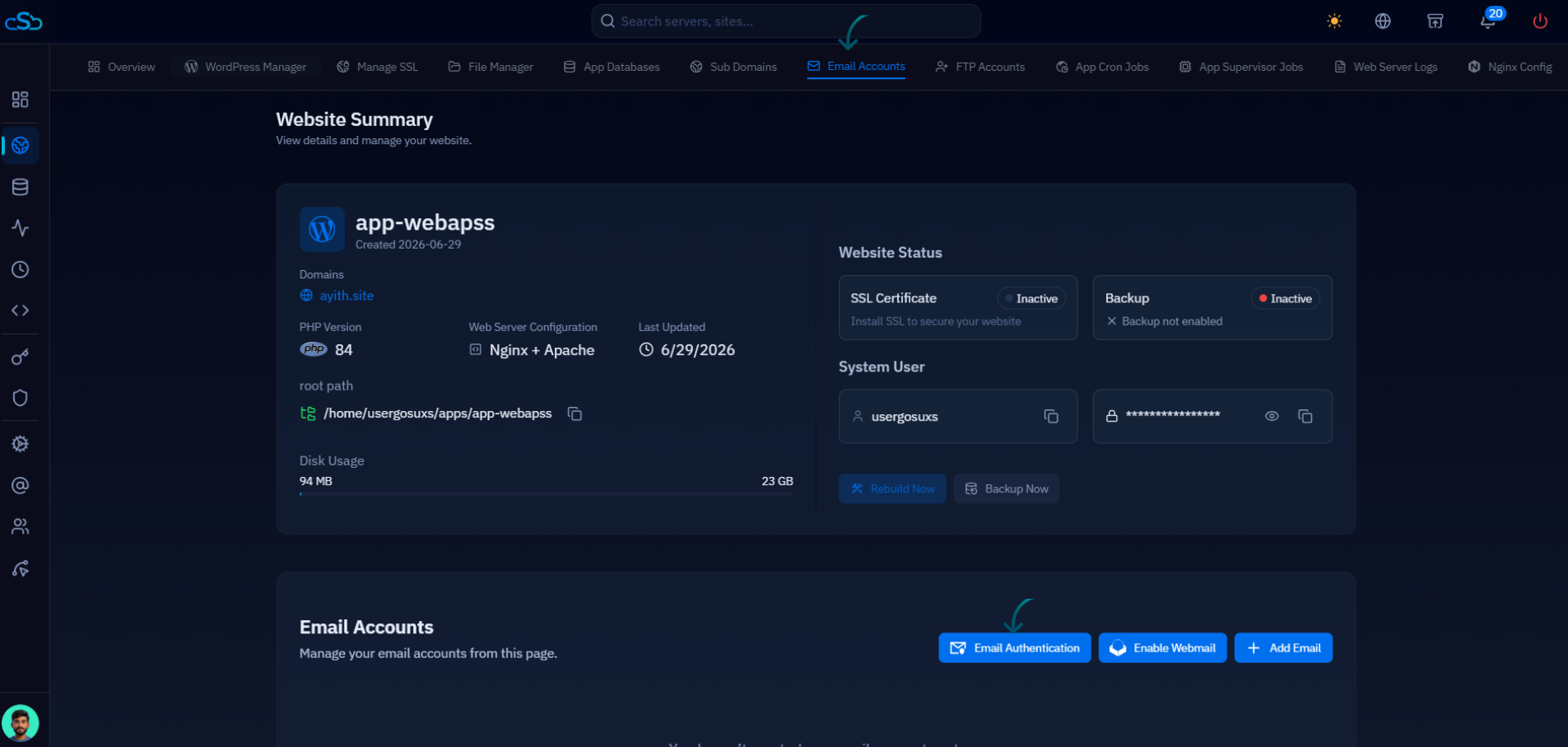
This is the layer where a control panel earns its keep. CloudStick's mail setup configures professional email on your server from the dashboard: you create mailboxes for a domain without touching Postfix or Dovecot config, and the DNS side — MX, SPF, DKIM, and DMARC — is published automatically through the Cloudflare integration, or shown as exact records to paste into whatever DNS host you use. The stack underneath is the same standard Postfix and Dovecot described above; the panel just removes the config-file surgery and the sync mistakes that come with it. Whichever route you take, finish by connecting a real client — IMAP on 993, SMTP on 587, full email address as the username — and send a test message in both directions.
The real cost of running your own mail
Setting the stack up is a weekend; operating it is forever, and it is only fair to say so. Deliverability is the ongoing tax: your IP's reputation is yours to build and defend, a fresh IP needs weeks of low-volume warm-up before bulk receivers trust it, and one compromised contact form on the same server can land you on a blocklist overnight. That means monitoring — the Postfix queue for messages that stop moving, blocklist checks for your IP, and the aggregate reports DMARC sends you about who is mailing as your domain. It also means updates: Postfix and Dovecot are internet-facing daemons, and security patches cannot wait for a quiet week.
The practical next step is a checklist run in order: confirm outbound port 25 with nc before anything else, publish the A, MX, SPF, DKIM, and DMARC records, set the PTR at your VPS provider, issue the TLS certificate, create one mailbox, and send a test message to a Gmail address — then open that message's headers and confirm SPF, DKIM, and DMARC all show pass. If any of them fail, fix DNS before inviting users on. Run through it once and you will know exactly what your mail stack is doing — which is more than most people can say about their inbox.

