White-Label Server Management for Agencies: A How-To Guide

%203.png&w=256&q=75)
Why White-Labeling Matters
White-labeling replaces the control panel vendor's branding with your agency's own logo and domain, so the dashboard your client logs into every day looks like it belongs to you, not to a third-party SaaS they've never heard of. The panel itself doesn't change — the same server management, backups, and SSL renewal keep running underneath — but the interface your client actually touches carries your brand.
This matters more than it sounds like it should, because clients form their sense of value from what they see, not from what's running in the background. A client who logs into "hosting.youragency.com" every month sees a platform you built and maintain. A client who logs into a generic vendor dashboard with the vendor's logo in the corner sees a tool you happen to resell — and starts asking why they're paying you a markup on something they could sign up for directly.
That distinction shows up directly in retention. Unbranded tooling makes the vendor switchable in the client's mind; branded tooling makes your agency the thing they'd have to leave.
What Gets Rebranded
White-labeling covers the surface a client actually sees: the dashboard's logo, the color accents, and — critically — the URL in the address bar. It does not, and shouldn't, touch the underlying server architecture your agency relies on to actually run sites.
On CloudStick, the isolated system users per site, the per-site PHP-FPM pool separation, the automatic Let's Encrypt renewal, and the Visual Database Manager all keep working exactly the same way whether a client hits the dashboard at the vendor's default domain or at your custom one. Rebranding is purely a presentation layer swapped on top of infrastructure that doesn't change.
That's the point: your client gets a platform that looks and feels like yours, while your agency still benefits from a vendor handling the operational complexity of nginx configs, PHP-FPM pools, and firewall rules you'd otherwise maintain by hand.
Setting Up Your Custom Domain
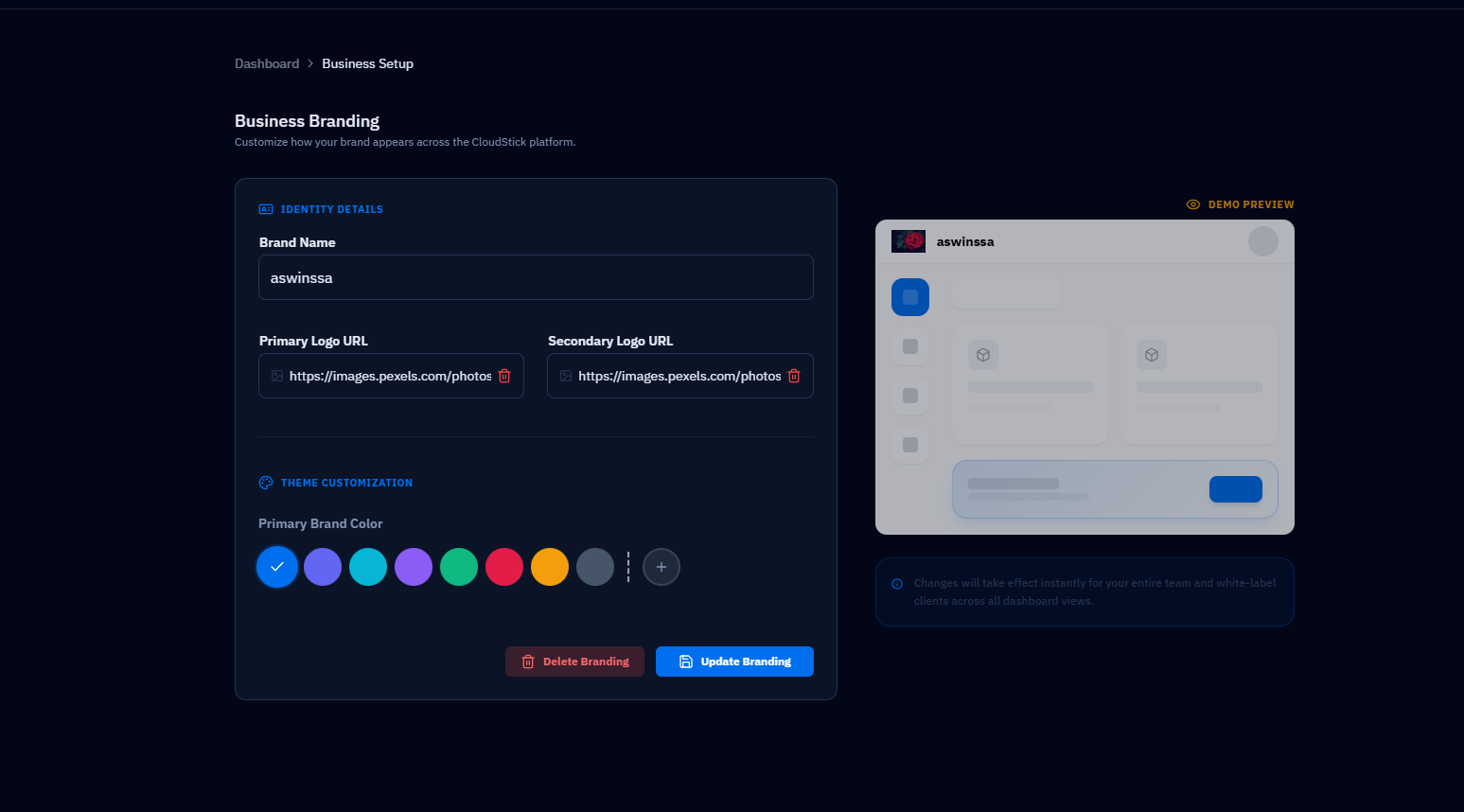
Setting up a white-label domain starts with picking a subdomain of your own agency domain, something like hosting.youragency.com or panel.youragency.com, rather than reusing your main marketing site's hostname. In CloudStick, this is configured from the White-Label settings under your account, where you enter the custom domain and upload your logo before pointing DNS at it.
Once the domain is registered in the dashboard, you'll get a target hostname to create a CNAME record for. That's the only DNS change required — no A record juggling, no separate hosting for the dashboard itself.
Connecting DNS and SSL
SSL for your custom dashboard domain is issued automatically once the CNAME resolves correctly — you don't upload a certificate or manage renewal yourself. CloudStick detects the verified custom domain and provisions a certificate for it the same way it does for a client website's Let's Encrypt SSL, with auto-renewal handled in the background.
The CNAME record must fully propagate before certificate issuance will succeed. DNS changes can take anywhere from a few minutes to a few hours depending on your registrar's TTL, so confirm with dig before opening a support ticket about a stuck certificate.
What to Expect (and Its Limits)
White-labeling with a custom domain is a Business plan feature on CloudStick, not something available on lower tiers. If you're evaluating whether to upgrade, this is the concrete capability you're paying for: your logo, your domain, and a dashboard your clients associate with your agency rather than with CloudStick.
It's worth setting realistic expectations before you sell it internally as a bigger change than it is. White-labeling rebrands the dashboard chrome and login experience — it doesn't rename the underlying product in support emails, invoices, or documentation unless you update those separately, and it doesn't change server performance or capacity limits, which are still governed by your plan and server resources.
Downgrading from Business to a lower plan reverts the dashboard to default branding and drops the custom domain. If clients bookmark your custom URL, plan any downgrade around a client communication so a broken login link doesn't land in their inbox unannounced.
Rolling It Out to Clients
Roll out the white-label dashboard to existing clients with a short heads-up email rather than a silent switch, since their old bookmark or saved login link will need to be swapped for the new domain. Send the new URL, confirm their existing credentials still work (they do — only the domain and branding change), and update any onboarding documents or welcome emails that reference the login screen by name.
For new clients, bake the white-label domain into onboarding from day one so they never see any branding but yours. Combined with role-based access that limits each client to their own site rather than your full server fleet, a white-labeled dashboard turns server management from a vendor tool you resell into a product your agency owns in the client's eyes — which is exactly the perception that supports charging a retainer for it.

