What is Anti-Bruteforce shield and how do I enable it?
Overview
Brute-force attacks are one of the most common threats facing any internet-connected server. Attackers automate thousands of login attempts per minute against services like SSH and FTP, hoping to guess valid credentials. CloudStick's Brute Force Shield — powered by the CSF (ConfigServer Security & Firewall) Fail2ban integration — detects this suspicious login activity automatically and temporarily blocks the offending IP address before a successful intrusion can occur.
This guide explains what the Brute Force Shield does, how to enable it from the Server Security page, and the scope of its protection so you can make informed decisions about your overall security posture.
The CSF Firewall must be enabled before the Brute Force Shield can function. If you have not enabled it yet, see the How do I secure my server using a firewall? guide first.
Step 1: Enable the Brute Force Shield
Enabling the Brute Force Shield takes a single toggle in the Server Security page. Once active, it monitors authentication logs in real time and automatically blocks any IP that exceeds the failed login threshold.
1. Open your Server panel: From the CloudStick Dashboard, click on the server you want to protect to open its management view.
2. Navigate to Security: In the left-hand navigation, click the shield icon to open the Server Security page.
3. Locate Core Firewall Management: Scroll to the Core Firewall Management section. You will see two rows — Firewall Status and Brute Force Shield.
4. Toggle on Brute Force Shield: Click the toggle next to Brute Force Shield. The description reads "Automatically blocks repeated failed login attempts for services like SSH and FTP." Once enabled, the toggle turns blue.
You do not need to restart the firewall after toggling the Brute Force Shield — the change takes effect immediately. The Firewall Restart button is only needed when modifying port rules or other CSF configuration changes.
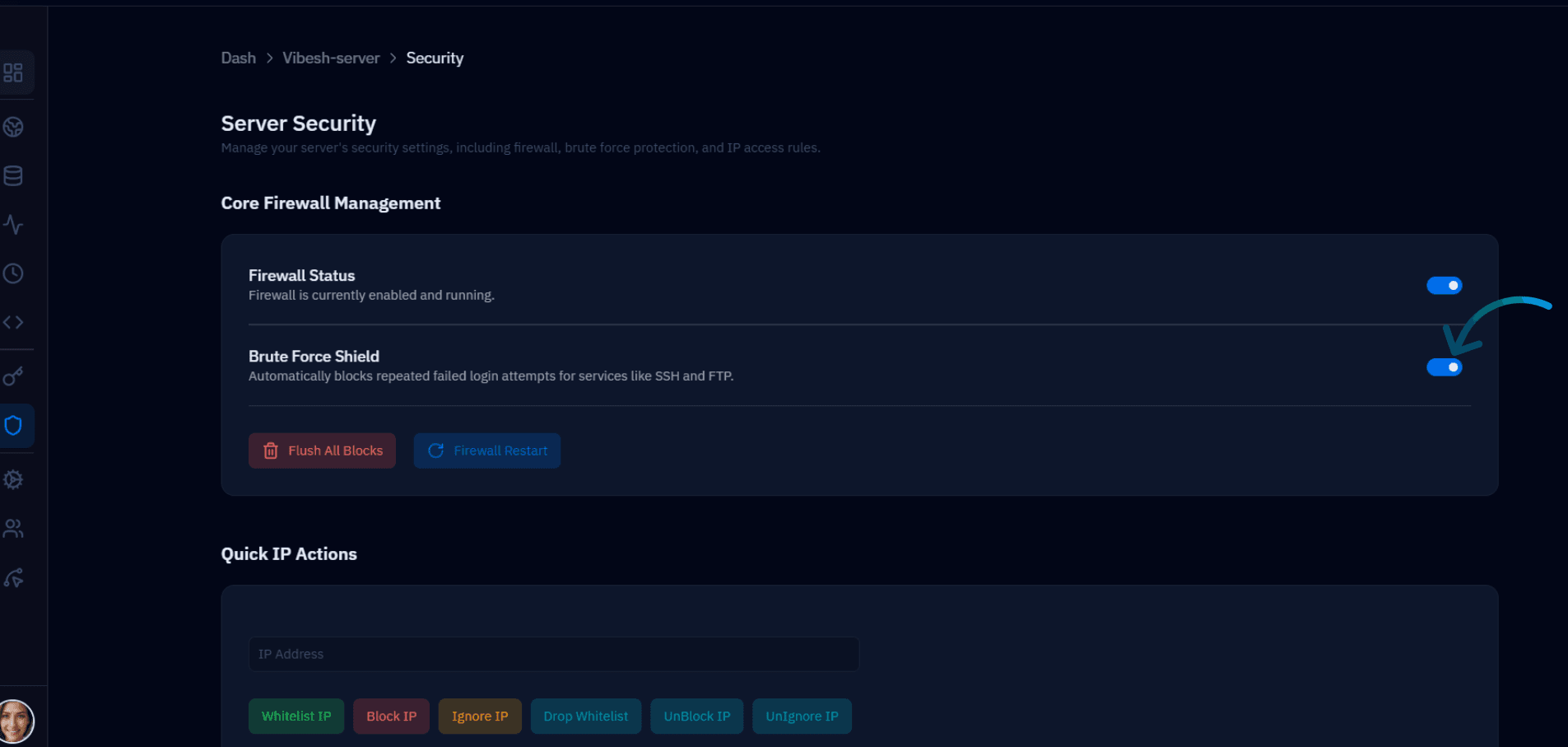
Fig. 01 — Server Security page showing the Brute Force Shield toggle enabled under Core Firewall Management.
Step 2: Understanding the Limitations
The Brute Force Shield is an effective first line of defense for credential-based attacks, but it is important to understand its scope so you can layer additional protections where needed.
What it protects against
Repeated login failures: It monitors services like SSH and FTP and blocks IPs that fail authentication too many times within a short window.
TCP-based credential attacks: The shield is effective against standard TCP brute-force attacks targeting login endpoints.
What it does not cover
It is not capable of filtering high-volume or large-scale attacks at line rate — volumetric DDoS traffic that saturates your server's network interface cannot be stopped at the OS level.
It may not be effective against distributed or advanced attack methods — such as low-and-slow attacks spread across thousands of IPs, or attacks using rotating proxies.
For large-scale or distributed attacks, the most effective mitigation is to block traffic at the data center or service provider level, where network-level filtering and scrubbing can absorb volumetric traffic before it reaches your server. Contact your hosting provider if you suspect an active DDoS campaign.